<?xml version="1.0" encoding="utf-8"?><?xml-stylesheet type="text/xsl" href="atom.xsl"?>

<feed xmlns="http://www.w3.org/2005/Atom">
    <id>https://garage.racelab.app/news</id>
    <title>Racelab Garage Blog</title>
    <updated>2026-05-14T00:00:00.000Z</updated>
    <generator>https://github.com/jpmonette/feed</generator>
    <link rel="alternate" href="https://garage.racelab.app/news"/>
    <subtitle>Racelab Garage Blog</subtitle>
    <icon>https://garage.racelab.app/img/favicon.ico</icon>
    <entry>
        <title type="html"><![CDATA[Tools Manager: Auto-Launch Your Sim Racing Stack]]></title>
        <id>https://garage.racelab.app/news/2026/05/14/2026/tools-manager</id>
        <link href="https://garage.racelab.app/news/2026/05/14/2026/tools-manager"/>
        <updated>2026-05-14T00:00:00.000Z</updated>
        <summary type="html"><![CDATA[Tools Manager]]></summary>
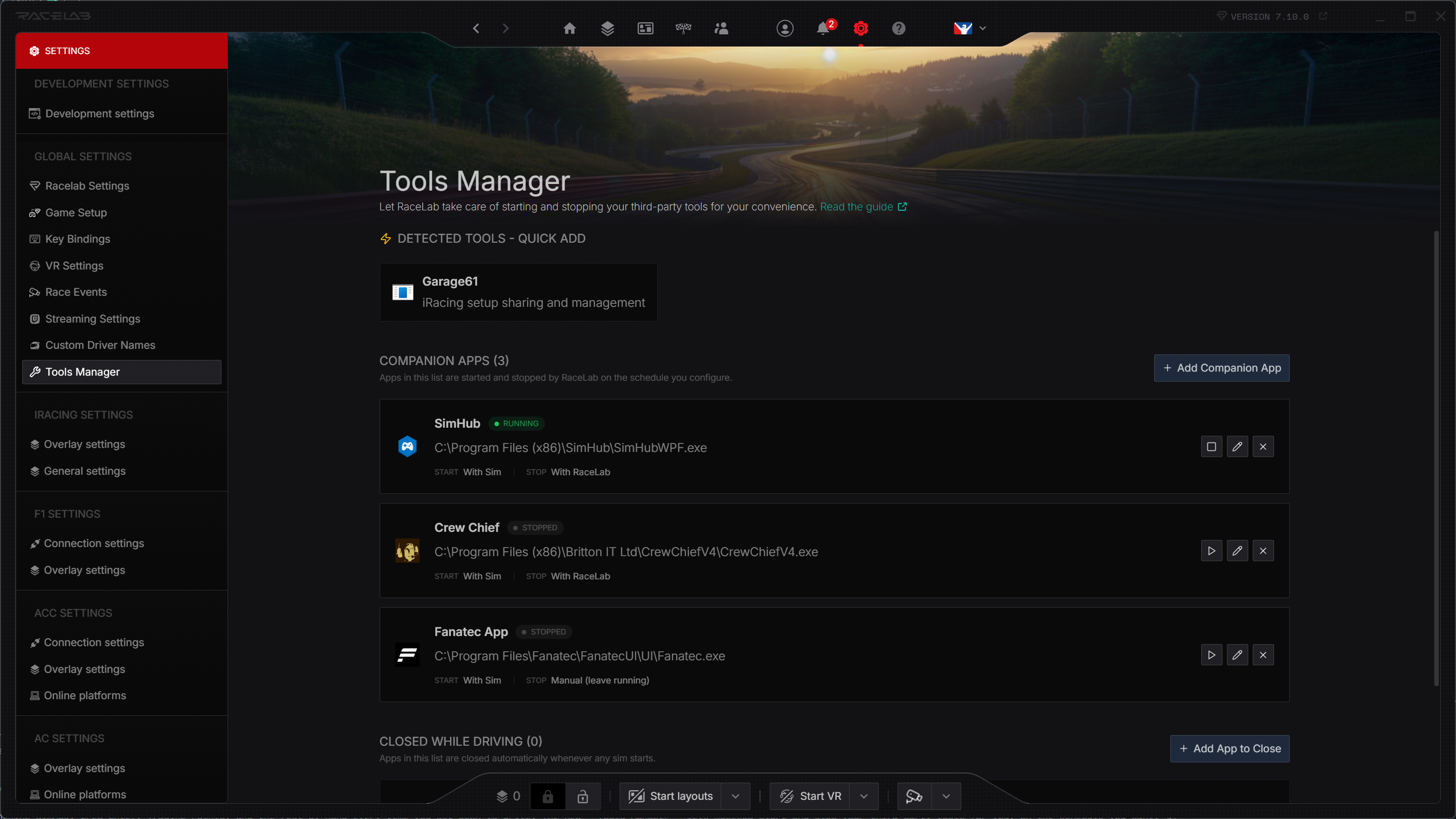
        <content type="html"><![CDATA[<p><img decoding="async" loading="lazy" alt="Tools Manager" src="https://garage.racelab.app/assets/images/tools-manager-1b842caaaa6ea74693ec68b616a1b18f.png" width="2880" height="1620" class="img_eSjB"></p>
<p>Stop launching SimHub, Crew Chief, Trading Paints, and the rest by hand every time you sit down to drive. The new <strong>Tools Manager</strong> lets RaceLab start and stop your third-party tools for you, on the schedule you want. 🛠️</p>
<p>Open it via <strong>Settings → Tools Manager</strong>.</p>
<h3 class="anchor anchorTargetStickyNavbar__dyZ" id="what-it-does">What it does<a href="https://garage.racelab.app/news/2026/05/14/2026/tools-manager#what-it-does" class="hash-link" aria-label="Direct link to What it does" title="Direct link to What it does" translate="no">​</a></h3>
<ul>
<li class=""><strong>Auto-launch tools</strong> when RaceLab starts or when sim is started</li>
<li class=""><strong>Auto-stop tools</strong> when RaceLab closes or when sim is closed</li>
<li class=""><strong>Auto-detect</strong> popular tools already installed on your system - add them with one click</li>
<li class=""><strong>Closed While Driving</strong> quietly closes any apps you don't want running once a sim starts</li>
<li class=""><strong>Pick from running processes</strong> to add a tool by selecting it from a live list</li>
<li class=""><strong>Configurable termination</strong> with graceful close, double-close for tray apps, force kill, or kill-by-name</li>
</ul>
<h3 class="anchor anchorTargetStickyNavbar__dyZ" id="two-kinds-of-tools">Two kinds of tools<a href="https://garage.racelab.app/news/2026/05/14/2026/tools-manager#two-kinds-of-tools" class="hash-link" aria-label="Direct link to Two kinds of tools" title="Direct link to Two kinds of tools" translate="no">​</a></h3>
<p>The Tools Manager handles two distinct workflows side by side:</p>
<ul>
<li class=""><strong>Apps</strong> - RaceLab starts and/or stops the tool for you (with RaceLab, with the sim, or manually)</li>
<li class=""><strong>Closed While Driving</strong> - RaceLab never launches the app, it only closes it when a sim starts. Perfect for browsers, chat apps, or anything else that shouldn't be running while you race</li>
</ul>
<h3 class="anchor anchorTargetStickyNavbar__dyZ" id="per-sim-control">Per-sim control<a href="https://garage.racelab.app/news/2026/05/14/2026/tools-manager#per-sim-control" class="hash-link" aria-label="Direct link to Per-sim control" title="Direct link to Per-sim control" translate="no">​</a></h3>
<p>Want Crew Chief to launch only for iRacing? Set <strong>Auto Start</strong> to <code>With Sim</code> and pick iRacing in the <strong>Sim Filter</strong>. Want a telemetry uploader to keep running after you disconnect so it can finish pushing your laps? Set <strong>Auto Stop</strong> to <code>Manual</code> and let it do its thing.</p>
<h3 class="anchor anchorTargetStickyNavbar__dyZ" id="getting-started">Getting started<a href="https://garage.racelab.app/news/2026/05/14/2026/tools-manager#getting-started" class="hash-link" aria-label="Direct link to Getting started" title="Direct link to Getting started" translate="no">​</a></h3>
<ol>
<li class="">Update RaceLab to <strong>v7.10.0</strong></li>
<li class="">Open <strong>Settings → Tools Manager</strong></li>
<li class="">Click any tool in <strong>Detected Tools - Quick Add</strong>, or hit <strong>+ Add</strong> to configure your own</li>
<li class="">Tweak the auto start/stop and termination settings to taste</li>
</ol>
<p>For the full walkthrough - including advanced settings, termination modes, and how to request a new auto-detection template - head over to the <a class="" href="https://garage.racelab.app/docs/advanced-features/tools-manager">Tools Manager guide</a>.</p>
<p>Got feedback or a tool you'd like us to auto-detect? Let us know on <a href="https://discord.com/channels/559298378291216384/688792546838970437" target="_blank" rel="noopener noreferrer" class="">Discord</a>!</p>]]></content>
        <author>
            <name>Racelab</name>
            <uri>https://racelab.app</uri>
        </author>
        <category label="Feature" term="Feature"/>
    </entry>
    <entry>
        <title type="html"><![CDATA[Trackmap V3: Ground-Up Rewrite]]></title>
        <id>https://garage.racelab.app/news/2026/03/18/2026/trackmap-rewrite</id>
        <link href="https://garage.racelab.app/news/2026/03/18/2026/trackmap-rewrite"/>
        <updated>2026-03-18T00:00:00.000Z</updated>
        <summary type="html"><![CDATA[The trackmap overlay has been completely rewritten from scratch. 🗺️]]></summary>
        <content type="html"><![CDATA[<p>The trackmap overlay has been completely rewritten from scratch. 🗺️</p>
<p>Trackmap V3 is a full rebuild with better performance and a handful of new features.</p>
<h3 class="anchor anchorTargetStickyNavbar__dyZ" id="new-features">New Features<a href="https://garage.racelab.app/news/2026/03/18/2026/trackmap-rewrite#new-features" class="hash-link" aria-label="Direct link to New Features" title="Direct link to New Features" translate="no">​</a></h3>
<ul>
<li class=""><strong>Customizable markers</strong> - Distinct marker styles for friends, leaders, and the reference car so you can spot them at a glance</li>
<li class=""><strong>Driver tags</strong> - Optional labeled tags displayed alongside cars on the map</li>
<li class=""><strong>Post-pit indicator</strong> - See which cars have just completed a pit stop</li>
</ul>
<h3 class="anchor anchorTargetStickyNavbar__dyZ" id="settings-migration">Settings Migration<a href="https://garage.racelab.app/news/2026/03/18/2026/trackmap-rewrite#settings-migration" class="hash-link" aria-label="Direct link to Settings Migration" title="Direct link to Settings Migration" translate="no">​</a></h3>
<p>Your V2 trackmap settings (track width, car size, borders, colors) are automatically migrated to V3 where possible. Some settings have been reset to new defaults due to architectural changes in the rewrite - you may need to tweak a few things to get your preferred look back. The new defaults are a solid starting point, so give them a try before reverting everything.</p>
<h3 class="anchor anchorTargetStickyNavbar__dyZ" id="feedback">Feedback<a href="https://garage.racelab.app/news/2026/03/18/2026/trackmap-rewrite#feedback" class="hash-link" aria-label="Direct link to Feedback" title="Direct link to Feedback" translate="no">​</a></h3>
<p>We'd love to hear what you think of the new trackmap. Share your feedback and suggestions on <a href="https://discord.com/channels/559298378291216384/688792546838970437" target="_blank" rel="noopener noreferrer" class="">Discord</a>!</p>]]></content>
        <author>
            <name>Racelab</name>
            <uri>https://racelab.app</uri>
        </author>
        <category label="Feature" term="Feature"/>
        <category label="Overlay" term="Overlay"/>
    </entry>
    <entry>
        <title type="html"><![CDATA[RaceLab Stream Deck Plugin]]></title>
        <id>https://garage.racelab.app/news/2026/02/23/2026/stream-deck-plugin</id>
        <link href="https://garage.racelab.app/news/2026/02/23/2026/stream-deck-plugin"/>
        <updated>2026-02-23T00:00:00.000Z</updated>
        <summary type="html"><![CDATA[RaceLab Stream Deck Plugin]]></summary>
        <content type="html"><![CDATA[<p><img decoding="async" loading="lazy" alt="RaceLab Stream Deck Plugin" src="https://garage.racelab.app/assets/images/streamdeck-81f35db10c3cafc1649641a73eaa718b.png" width="1920" height="960" class="img_eSjB"></p>
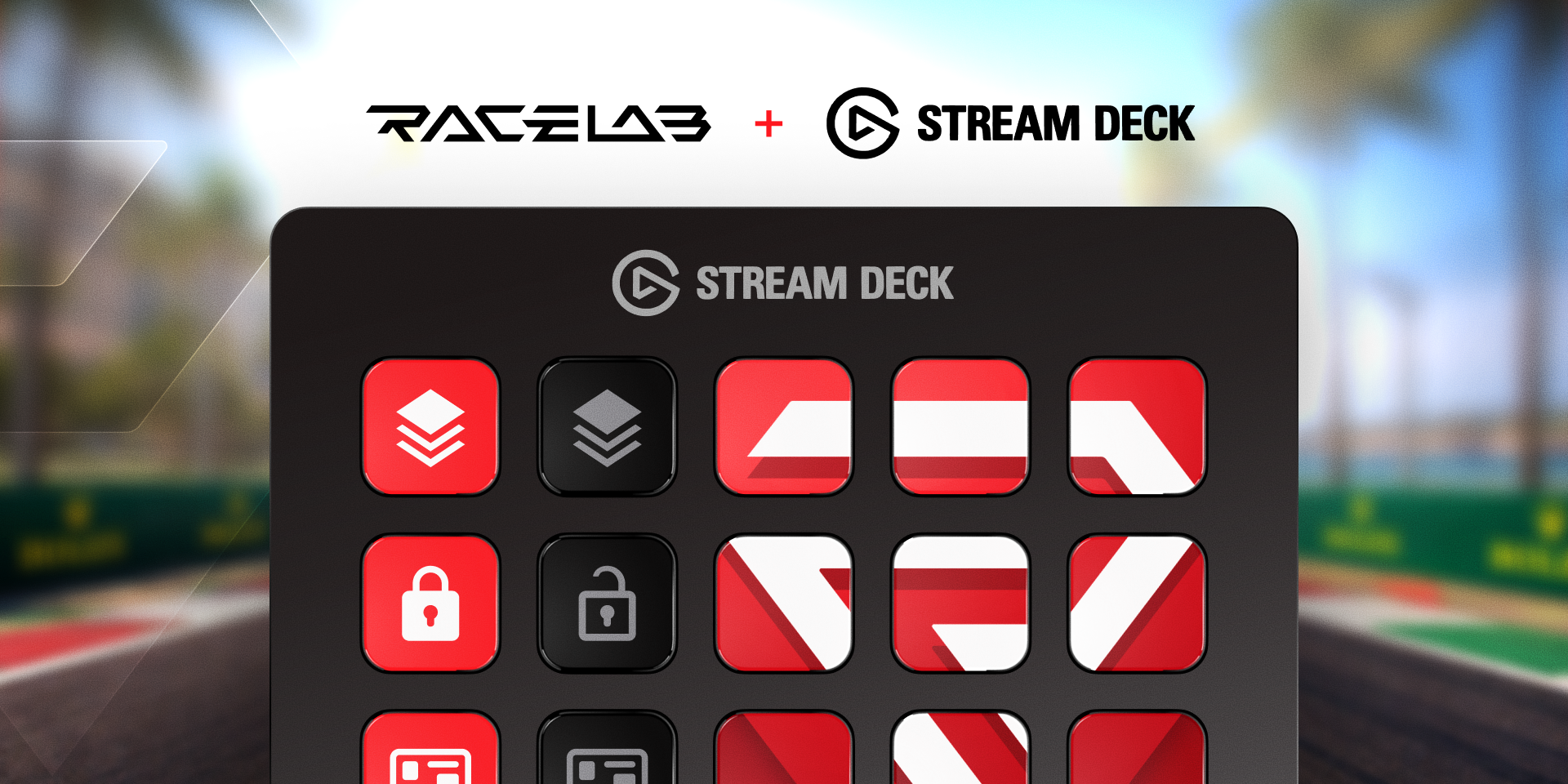
<p>Control your overlays without ever leaving the track: the official <strong>RaceLab Stream Deck Plugin</strong> brings 12 actions to your fingertips with real-time state sync.</p>
<h3 class="anchor anchorTargetStickyNavbar__dyZ" id="actions">Actions<a href="https://garage.racelab.app/news/2026/02/23/2026/stream-deck-plugin#actions" class="hash-link" aria-label="Direct link to Actions" title="Direct link to Actions" translate="no">​</a></h3>
<div style="display:flex;align-items:center;gap:16px;margin:20px 0"><img src="https://garage.racelab.app/img/stream-deck/action-launch.png" width="64" height="64" style="border-radius:17%;flex-shrink:0" alt="Launch RaceLab"><div><strong>Launch RaceLab</strong><br><p>Short press to launch, long press to close. The icon shows whether RaceLab
is running.</p></div></div>
<div style="display:flex;align-items:center;gap:16px;margin:20px 0"><img src="https://garage.racelab.app/img/stream-deck/overlay-relative.svg" width="64" height="64" style="border-radius:17%;flex-shrink:0" alt="Toggle Overlay"><div><strong>Toggle Overlay</strong><br><p>Toggle any of 33 overlays on or off. The icon updates live to reflect the
overlay state.</p></div></div>
<div style="display:flex;gap:8px;flex-wrap:wrap;margin:0 0 20px 80px"><img src="https://garage.racelab.app/img/stream-deck/overlay-standings.svg" width="48" height="48" style="border-radius:17%" alt="Standings"><img src="https://garage.racelab.app/img/stream-deck/overlay-track-map.svg" width="48" height="48" style="border-radius:17%" alt="Track Map"><img src="https://garage.racelab.app/img/stream-deck/overlay-fuel-calculator.svg" width="48" height="48" style="border-radius:17%" alt="Fuel Calculator"><img src="https://garage.racelab.app/img/stream-deck/overlay-input-telemetry.svg" width="48" height="48" style="border-radius:17%" alt="Input Telemetry"><img src="https://garage.racelab.app/img/stream-deck/overlay-race-events.svg" width="48" height="48" style="border-radius:17%" alt="Race Events"><img src="https://garage.racelab.app/img/stream-deck/overlay-weather-monitor.svg" width="48" height="48" style="border-radius:17%" alt="Weather Monitor"><img src="https://garage.racelab.app/img/stream-deck/overlay-generic.svg" width="48" height="48" style="border-radius:17%" alt="Generic Overlay"></div>
<div style="display:flex;align-items:center;gap:16px;margin:20px 0"><img src="https://garage.racelab.app/img/stream-deck/action-show-hide.png" width="64" height="64" style="border-radius:17%;flex-shrink:0" alt="Show / Hide Overlays"><div><strong>Show / Hide Overlays</strong><br><p>Hide or reveal all overlays at once with a single press.</p></div></div>
<div style="display:flex;align-items:center;gap:16px;margin:20px 0"><img src="https://garage.racelab.app/img/stream-deck/action-lock-unlock.svg" width="64" height="64" style="border-radius:17%;flex-shrink:0" alt="Lock / Unlock Overlays"><div><strong>Lock / Unlock Overlays</strong><br><p>Prevent accidental repositioning during a race.</p></div></div>
<div style="display:flex;align-items:center;gap:16px;margin:20px 0"><img src="https://garage.racelab.app/img/stream-deck/action-layouts.png" width="64" height="64" style="border-radius:17%;flex-shrink:0" alt="Start / Stop Layouts"><div><strong>Start / Stop Layouts</strong><br><p>Enter or exit the layout editor to reposition your overlays.</p></div></div>
<div style="display:flex;align-items:center;gap:16px;margin:20px 0"><img src="https://garage.racelab.app/img/stream-deck/action-activate-overlay-set.svg" width="64" height="64" style="border-radius:17%;flex-shrink:0;background:#1a1a1a" alt="Activate Overlay Set"><div><strong>Activate Overlay Set</strong><br><p>Jump directly to any overlay set (A through J). The button highlights when
that set is active.</p></div></div>
<div style="display:flex;align-items:center;gap:16px;margin:20px 0"><img src="https://garage.racelab.app/img/stream-deck/action-cycle-overlay-set.svg" width="64" height="64" style="border-radius:17%;flex-shrink:0;background:#1a1a1a" alt="Cycle Overlay Set"><div><strong>Cycle Overlay Set</strong><br><p>Step forward or backward through your overlay sets.</p></div></div>
<div style="display:flex;align-items:center;gap:16px;margin:20px 0"><img src="https://garage.racelab.app/img/stream-deck/action-start-stop-vr.svg" width="64" height="64" style="border-radius:17%;flex-shrink:0" alt="Start / Stop VR"><div><strong>Start / Stop VR</strong><br><p>Toggle VR mode on or off. The icon reflects the current VR state in real
time.</p></div></div>
<div style="display:flex;align-items:center;gap:16px;margin:20px 0"><img src="https://garage.racelab.app/img/stream-deck/action-recenter-vr.svg" width="64" height="64" style="border-radius:17%;flex-shrink:0;background:#1a1a1a" alt="Recenter VR"><div><strong>Recenter VR</strong><br><p>Recenter your VR view with a single press.</p></div></div>
<div style="display:flex;align-items:center;gap:16px;margin:20px 0"><img src="https://garage.racelab.app/img/stream-deck/action-cycle-delta-bar.svg" width="64" height="64" style="border-radius:17%;flex-shrink:0;background:#1a1a1a" alt="Cycle Delta Bar"><div><strong>Cycle Delta Bar</strong><br><p>Cycle through five comparison modes: Session Best, Personal Best, Last Lap,
Friend Best, and All Best. The icon shows the active mode.</p></div></div>
<div style="display:flex;align-items:center;gap:16px;margin:20px 0"><img src="https://garage.racelab.app/img/stream-deck/action-race-events.svg" width="64" height="64" style="border-radius:17%;flex-shrink:0;background:#1a1a1a" alt="Race Events"><div><strong>Race Events</strong><br><p>Navigate incidents, events, and review marks during replay.</p></div></div>
<div style="display:flex;align-items:center;gap:16px;margin:20px 0"><img src="https://garage.racelab.app/img/stream-deck/action-reset-g-force.svg" width="64" height="64" style="border-radius:17%;flex-shrink:0;background:#1a1a1a" alt="Reset G-Force"><div><strong>Reset G-Force</strong><br><p>Reset the G-Force Meter's peak values instantly.</p></div></div>
<h3 class="anchor anchorTargetStickyNavbar__dyZ" id="themes">Themes<a href="https://garage.racelab.app/news/2026/02/23/2026/stream-deck-plugin#themes" class="hash-link" aria-label="Direct link to Themes" title="Direct link to Themes" translate="no">​</a></h3>
<p>Every button supports multiple icon themes so your Stream Deck matches your style. Select a theme in the button's settings panel within the Stream Deck app.</p>
<p><strong>Flat</strong> — Clean, solid icons with a colored background when active. Presets available + color picker (red by default).</p>
<div style="display:flex;gap:8px;flex-wrap:wrap;margin:8px 0 24px"><img src="https://garage.racelab.app/img/stream-deck/theme-flat-off.svg" width="64" height="64" style="border-radius:17%" alt="Flat - Overlay off"><img src="https://garage.racelab.app/img/stream-deck/theme-launch-flat-off.png" width="64" height="64" style="border-radius:17%" alt="Flat - Launch off"><img src="https://garage.racelab.app/img/stream-deck/theme-show-flat-off.png" width="64" height="64" style="border-radius:17%" alt="Flat - Show/Hide off"></div>
<p><strong>Glow</strong> — Neon-style icons with a soft colored glow on a dark background. Presets available + color picker (red by default).</p>
<div style="display:flex;gap:8px;flex-wrap:wrap;margin:8px 0 24px"><img src="https://garage.racelab.app/img/stream-deck/theme-glow.svg" width="64" height="64" style="border-radius:17%" alt="Glow - Overlay on"><img src="https://garage.racelab.app/img/stream-deck/theme-glow-off.svg" width="64" height="64" style="border-radius:17%" alt="Glow - Overlay off"><img src="https://garage.racelab.app/img/stream-deck/theme-launch-glow.png" width="64" height="64" style="border-radius:17%" alt="Glow - Launch on"><img src="https://garage.racelab.app/img/stream-deck/theme-launch-glow-off.png" width="64" height="64" style="border-radius:17%" alt="Glow - Launch off"><img src="https://garage.racelab.app/img/stream-deck/theme-show-glow.png" width="64" height="64" style="border-radius:17%" alt="Glow - Show on"><img src="https://garage.racelab.app/img/stream-deck/theme-show-glow-off.png" width="64" height="64" style="border-radius:17%" alt="Glow - Show off"><img src="https://garage.racelab.app/img/stream-deck/theme-lock-glow.png" width="64" height="64" style="border-radius:17%" alt="Glow - Lock on"><img src="https://garage.racelab.app/img/stream-deck/theme-lock-glow-off.png" width="64" height="64" style="border-radius:17%" alt="Glow - Lock off"></div>
<p><strong>Plain</strong> — Simple white-on-black icons. No color, no effects.</p>
<div style="display:flex;gap:8px;flex-wrap:wrap;margin:8px 0 24px"><img src="https://garage.racelab.app/img/stream-deck/theme-plain.svg" width="64" height="64" style="border-radius:17%" alt="Plain - Overlay"><img src="https://garage.racelab.app/img/stream-deck/theme-launch-plain.png" width="64" height="64" style="border-radius:17%" alt="Plain - Launch on"><img src="https://garage.racelab.app/img/stream-deck/theme-show-plain-off.png" width="64" height="64" style="border-radius:17%" alt="Plain - Show off"><img src="https://garage.racelab.app/img/stream-deck/theme-lock-plain.png" width="64" height="64" style="border-radius:17%" alt="Plain - Lock on"><img src="https://garage.racelab.app/img/stream-deck/theme-lock-plain-off.png" width="64" height="64" style="border-radius:17%" alt="Plain - Lock off"></div>
<p><strong>Glass</strong> — Translucent, frosted-glass icons available in 13 color tints.</p>
<div style="display:flex;gap:8px;flex-wrap:wrap;margin:8px 0 24px"><img src="https://garage.racelab.app/img/stream-deck/theme-show-glass-off.png" width="64" height="64" style="border-radius:17%" alt="Glass Blue - on"><img src="https://garage.racelab.app/img/stream-deck/theme-show-glass-on.png" width="64" height="64" style="border-radius:17%" alt="Glass Blue - off"><img src="https://garage.racelab.app/img/stream-deck/theme-glass-amber.png" width="64" height="64" style="border-radius:17%" alt="Glass Amber"><img src="https://garage.racelab.app/img/stream-deck/theme-glass-orange.png" width="64" height="64" style="border-radius:17%" alt="Glass Orange"><img src="https://garage.racelab.app/img/stream-deck/theme-glass-lime.png" width="64" height="64" style="border-radius:17%" alt="Glass Lime"><img src="https://garage.racelab.app/img/stream-deck/theme-glass-green.png" width="64" height="64" style="border-radius:17%" alt="Glass Green"><img src="https://garage.racelab.app/img/stream-deck/theme-glass-teal.png" width="64" height="64" style="border-radius:17%" alt="Glass Teal"><img src="https://garage.racelab.app/img/stream-deck/theme-glass-cyan.png" width="64" height="64" style="border-radius:17%" alt="Glass Cyan"><img src="https://garage.racelab.app/img/stream-deck/theme-glass-blue.png" width="64" height="64" style="border-radius:17%" alt="Glass Blue"><img src="https://garage.racelab.app/img/stream-deck/theme-glass-indigo.png" width="64" height="64" style="border-radius:17%" alt="Glass Indigo"><img src="https://garage.racelab.app/img/stream-deck/theme-glass-purple.png" width="64" height="64" style="border-radius:17%" alt="Glass Purple"><img src="https://garage.racelab.app/img/stream-deck/theme-glass-pink.png" width="64" height="64" style="border-radius:17%" alt="Glass Pink"><img src="https://garage.racelab.app/img/stream-deck/theme-glass-slate.png" width="64" height="64" style="border-radius:17%" alt="Glass Slate"><img src="https://garage.racelab.app/img/stream-deck/theme-glass-white.png" width="64" height="64" style="border-radius:17%" alt="Glass White"></div>
<h3 class="anchor anchorTargetStickyNavbar__dyZ" id="getting-started">Getting started<a href="https://garage.racelab.app/news/2026/02/23/2026/stream-deck-plugin#getting-started" class="hash-link" aria-label="Direct link to Getting started" title="Direct link to Getting started" translate="no">​</a></h3>
<ol>
<li class="">Install the <strong>RaceLab</strong> plugin from the Elgato Marketplace in the Stream Deck app</li>
<li class="">Make sure <strong>RaceLab</strong> is running</li>
<li class="">Drag any RaceLab action from the action list onto your Stream Deck</li>
<li class="">Configure the button's settings (overlay, theme, color)</li>
</ol>
<p>For a full breakdown of every action and setting, check out the <a class="" href="https://garage.racelab.app/docs/stream-deck">Stream Deck help article</a>.</p>
<p>Got questions or feedback? Let us know on <a href="https://discord.com/channels/559298378291216384/688792546838970437" target="_blank" rel="noopener noreferrer" class="">Discord</a>!</p>]]></content>
        <author>
            <name>Racelab</name>
            <uri>https://racelab.app</uri>
        </author>
        <category label="Feature" term="Feature"/>
    </entry>
    <entry>
        <title type="html"><![CDATA[RaceRoom Racing Experience Integration!]]></title>
        <id>https://garage.racelab.app/news/2026/02/17/2026/raceroom-integration</id>
        <link href="https://garage.racelab.app/news/2026/02/17/2026/raceroom-integration"/>
        <updated>2026-02-17T00:00:00.000Z</updated>
        <summary type="html"><![CDATA[RaceLab x RaceRoom Racing Experience]]></summary>
        <content type="html"><![CDATA[<p><img decoding="async" loading="lazy" alt="RaceLab x RaceRoom Racing Experience" src="https://garage.racelab.app/assets/images/raceroom-c44c0ea428759e2f7e204f77afaf2e6c.png" width="1200" height="630" class="img_eSjB"></p>
<p>It's finally here - <strong>RaceRoom Racing Experience</strong> is now fully supported in RaceLab! 🏁</p>
<p>This has been one of the most requested integrations from our community, and we're thrilled to deliver. Starting with <strong>v7.0.1</strong>, you can use your favorite RaceLab overlays and telemetry tools while racing in RaceRoom.</p>
<h3 class="anchor anchorTargetStickyNavbar__dyZ" id="whats-included">What's included?<a href="https://garage.racelab.app/news/2026/02/17/2026/raceroom-integration#whats-included" class="hash-link" aria-label="Direct link to What's included?" title="Direct link to What's included?" translate="no">​</a></h3>
<p>All core RaceLab features work out of the box with RaceRoom:</p>
<ul>
<li class=""><strong>Live Overlays</strong> - Standings, relative, inputs, fuel calculator, and more</li>
<li class=""><strong>Telemetry</strong> - Full telemetry data including lap times, sector splits, and fuel consumption</li>
<li class=""><strong>Multi-class support</strong> - Proper car class grouping so multi-class races display correctly</li>
<li class=""><strong>Track Maps</strong> - Live track map and minimap with driver positions</li>
<li class=""><strong>VR Support</strong> - RaceRoom works with RaceLab VR via OpenVR</li>
</ul>
<h3 class="anchor anchorTargetStickyNavbar__dyZ" id="getting-started">Getting started<a href="https://garage.racelab.app/news/2026/02/17/2026/raceroom-integration#getting-started" class="hash-link" aria-label="Direct link to Getting started" title="Direct link to Getting started" translate="no">​</a></h3>
<ol>
<li class="">In RaceLab, go to <strong>Settings → Game Setup</strong></li>
<li class="">Find RaceRoom Racing Experience and click the <strong>Configure</strong> button</li>
<li class="">Setup your overlays or layouts</li>
<li class="">Launch RaceRoom and hop into a session</li>
</ol>
<p><img decoding="async" loading="lazy" alt="RaceRoom Game Setup" src="https://garage.racelab.app/assets/images/raceroom-setup-b612c769f560394cc43afec33ba557da.png" width="1354" height="261" class="img_eSjB"></p>
<h3 class="anchor anchorTargetStickyNavbar__dyZ" id="we-need-your-feedback">We need your feedback!<a href="https://garage.racelab.app/news/2026/02/17/2026/raceroom-integration#we-need-your-feedback" class="hash-link" aria-label="Direct link to We need your feedback!" title="Direct link to We need your feedback!" translate="no">​</a></h3>
<p>As with any new integration, there may be rough edges. If you run into any issues or have suggestions, please let us know on our <a href="https://discord.com/channels/559298378291216384/688792546838970437" target="_blank" rel="noopener noreferrer" class="">Discord</a>. Your feedback helps us improve the experience for everyone.</p>
<p>Happy racing! 🏎️</p>]]></content>
        <author>
            <name>Racelab</name>
            <uri>https://racelab.app</uri>
        </author>
        <category label="RaceRoom" term="RaceRoom"/>
    </entry>
    <entry>
        <title type="html"><![CDATA[New: Car Class Grouping by Car Number]]></title>
        <id>https://garage.racelab.app/news/2025/12/13/2025/car-class-grouping</id>
        <link href="https://garage.racelab.app/news/2025/12/13/2025/car-class-grouping"/>
        <updated>2025-12-13T00:00:00.000Z</updated>
        <summary type="html"><![CDATA[{/ Car Class Grouping /}]]></summary>
        <content type="html"><![CDATA[
<p>Running a custom league or special event in iRacing? We've got something for you. 🏁</p>
<p>RaceLab now supports a new <strong>Car Class Grouping</strong> option: <strong>Group by Car Number (hundreds)</strong>.</p>
<h3 class="anchor anchorTargetStickyNavbar__dyZ" id="how-it-works">How it works<a href="https://garage.racelab.app/news/2025/12/13/2025/car-class-grouping#how-it-works" class="hash-link" aria-label="Direct link to How it works" title="Direct link to How it works" translate="no">​</a></h3>
<p>This option groups cars based on the hundreds digit of their car number. For example:</p>
<ul>
<li class="">Cars <strong>#100-199</strong> are grouped together as one class</li>
<li class="">Cars <strong>#200-299</strong> form another class</li>
<li class="">And so on</li>
</ul>
<p>This means league organizers and event hosts can define custom class groupings simply by assigning car number ranges - and RaceLab will automatically pick them up and display them correctly in your Standings and Relative overlays.</p>
<h3 class="anchor anchorTargetStickyNavbar__dyZ" id="why-this-matters">Why this matters<a href="https://garage.racelab.app/news/2025/12/13/2025/car-class-grouping#why-this-matters" class="hash-link" aria-label="Direct link to Why this matters" title="Direct link to Why this matters" translate="no">​</a></h3>
<p>In official iRacing series, car classes are defined by the sim itself. But in custom leagues and special events, organizers often create their own class structures. Until now, RaceLab couldn't always group these correctly. With car number-based grouping, your overlays will show the right classes as long as the event uses number ranges to separate them.</p>
<h3 class="anchor anchorTargetStickyNavbar__dyZ" id="how-to-enable-it">How to enable it<a href="https://garage.racelab.app/news/2025/12/13/2025/car-class-grouping#how-to-enable-it" class="hash-link" aria-label="Direct link to How to enable it" title="Direct link to How to enable it" translate="no">​</a></h3>
<ol>
<li class="">Open RaceLab and go to <strong>Settings</strong></li>
<li class="">Look for the <strong>Car Class Grouping</strong> option under iRacing settings</li>
<li class="">Select <strong>Group by Car Number (hundreds)</strong></li>
<li class="">Your Standings and Relative overlays will now group drivers accordingly</li>
</ol>
<p>Perfect for endurance leagues, community events, or any race where custom class structures are used. Let us know how it works on <a href="https://discord.com/channels/559298378291216384/688792546838970437" target="_blank" rel="noopener noreferrer" class="">Discord</a>!</p>]]></content>
        <author>
            <name>Racelab</name>
            <uri>https://racelab.app</uri>
        </author>
        <category label="Feature" term="Feature"/>
    </entry>
    <entry>
        <title type="html"><![CDATA[One-Click Game Setup]]></title>
        <id>https://garage.racelab.app/news/2025/12/13/2025/game-setup</id>
        <link href="https://garage.racelab.app/news/2025/12/13/2025/game-setup"/>
        <updated>2025-12-13T00:00:00.000Z</updated>
        <summary type="html"><![CDATA[Setting up your games for RaceLab just got a whole lot easier. Introducing One-Click Game Setup! 🚀]]></summary>
        <content type="html"><![CDATA[<p>Setting up your games for RaceLab just got a whole lot easier. Introducing <strong>One-Click Game Setup</strong>! 🚀</p>
<h3 class="anchor anchorTargetStickyNavbar__dyZ" id="the-problem">The problem<a href="https://garage.racelab.app/news/2025/12/13/2025/game-setup#the-problem" class="hash-link" aria-label="Direct link to The problem" title="Direct link to The problem" translate="no">​</a></h3>
<p>Getting your sim racing game configured correctly for RaceLab used to require a few manual steps - adjusting display settings, enabling shared memory, configuring file paths. It wasn't hard, but it was easy to miss a step and then wonder why things weren't working.</p>
<h3 class="anchor anchorTargetStickyNavbar__dyZ" id="the-solution">The solution<a href="https://garage.racelab.app/news/2025/12/13/2025/game-setup#the-solution" class="hash-link" aria-label="Direct link to The solution" title="Direct link to The solution" translate="no">​</a></h3>
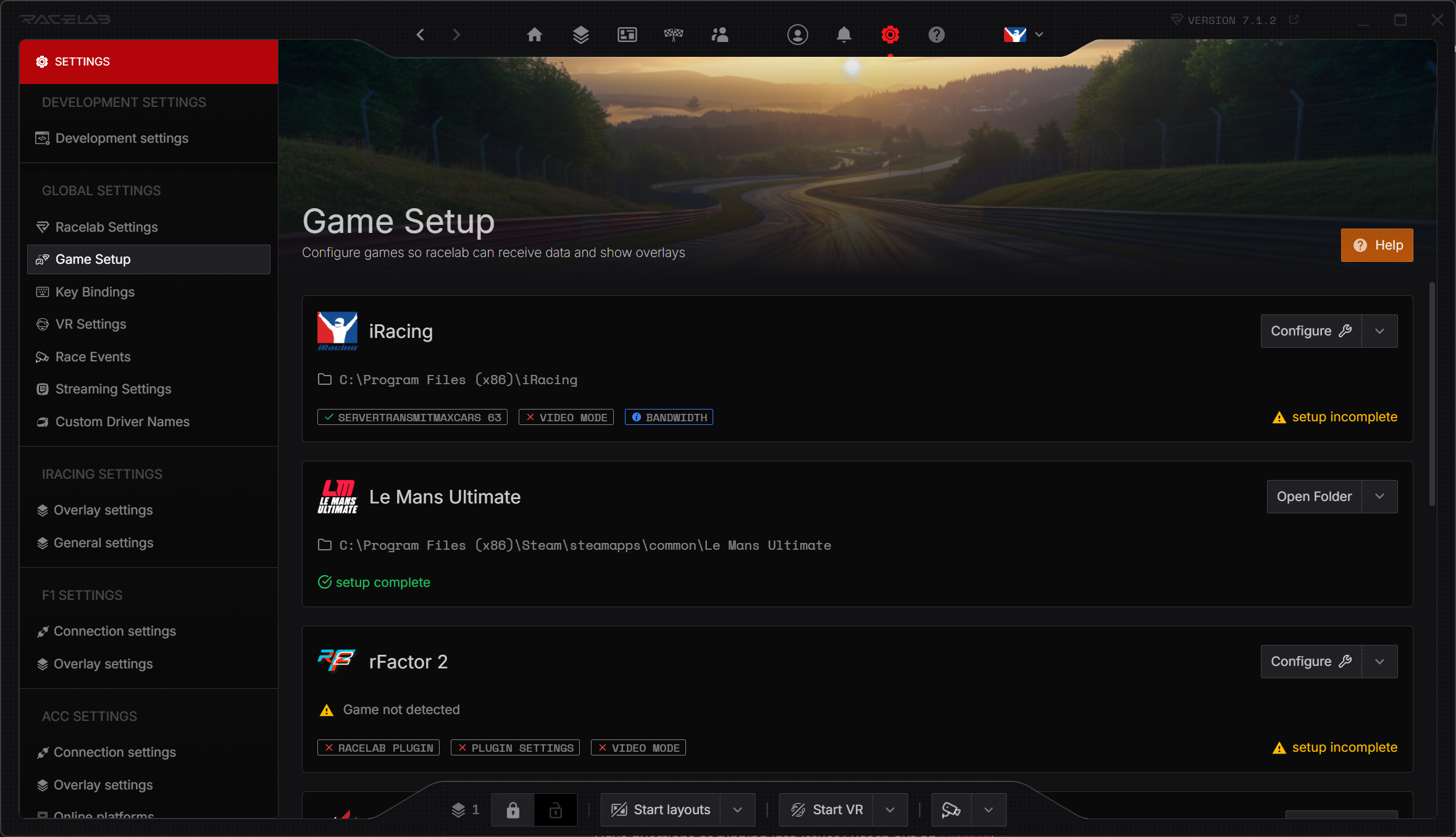
<p>With Game Setup, RaceLab can now <strong>automatically configure your games</strong> with a single click. No more digging through game settings or following multi-step guides. Just click the <strong>Configure</strong> button and RaceLab handles the rest.</p>
<p><img decoding="async" loading="lazy" alt="Automatic Game Setup" src="https://garage.racelab.app/assets/images/game-setup-48024b5c9ac724f8965e084670e0793b.png" width="2358" height="1355" class="img_eSjB"></p>
<h3 class="anchor anchorTargetStickyNavbar__dyZ" id="how-to-use-it">How to use it<a href="https://garage.racelab.app/news/2025/12/13/2025/game-setup#how-to-use-it" class="hash-link" aria-label="Direct link to How to use it" title="Direct link to How to use it" translate="no">​</a></h3>
<ol>
<li class="">Open RaceLab and go to <strong>Settings → Game Setup</strong></li>
<li class="">You'll see a list of your installed games</li>
<li class="">Click the <strong>Configure</strong> button next to any game</li>
<li class="">RaceLab will apply the required settings automatically</li>
</ol>
<p>That's it. One click and you're ready to race.</p>
<p>Have questions or running into issues? Reach out on <a href="https://discord.com/channels/559298378291216384/688792546838970437" target="_blank" rel="noopener noreferrer" class="">Discord</a>!</p>]]></content>
        <author>
            <name>Racelab</name>
            <uri>https://racelab.app</uri>
        </author>
        <category label="Feature" term="Feature"/>
    </entry>
    <entry>
        <title type="html"><![CDATA[The Lumina Theme & Column Reordering]]></title>
        <id>https://garage.racelab.app/news/2025/12/13/2025/lumina-theme</id>
        <link href="https://garage.racelab.app/news/2025/12/13/2025/lumina-theme"/>
        <updated>2025-12-13T00:00:00.000Z</updated>
        <summary type="html"><![CDATA[Lumina Theme - Relative Overlay]]></summary>
        <content type="html"><![CDATA[<p><img decoding="async" loading="lazy" alt="Lumina Theme - Relative Overlay" src="https://garage.racelab.app/assets/images/lumina-relative-1f81ec35f6f9893ca1aa3d3cdb09cec6.png" width="1165" height="682" class="img_eSjB"></p>
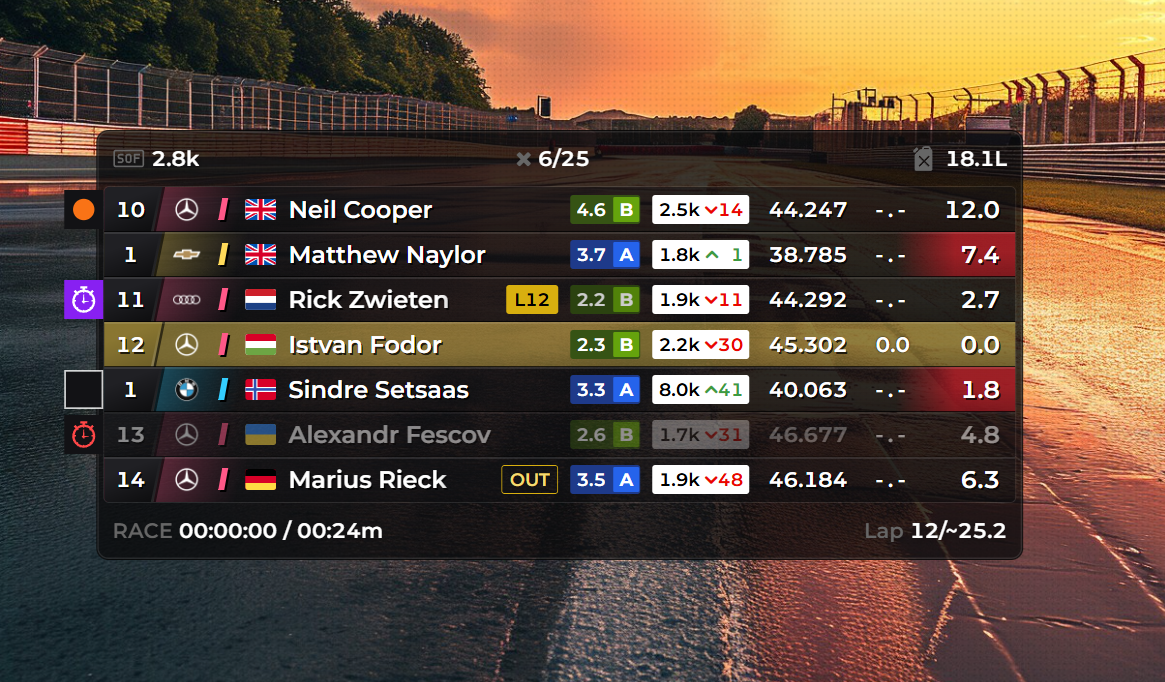
<p>Your Standings and Relative overlays just got a major visual upgrade! Introducing the <strong>Lumina Theme</strong> and <strong>column reordering</strong>. ✨</p>
<h3 class="anchor anchorTargetStickyNavbar__dyZ" id="the-lumina-theme">The Lumina Theme<a href="https://garage.racelab.app/news/2025/12/13/2025/lumina-theme#the-lumina-theme" class="hash-link" aria-label="Direct link to The Lumina Theme" title="Direct link to The Lumina Theme" translate="no">​</a></h3>
<p>Lumina is an all-new theme for the Standings and Relative overlays. It features a fresh, modern design that's clean, readable, and looks great on stream or in your cockpit.</p>
<p>Available for both:</p>
<ul>
<li class=""><strong>Standings Overlay</strong> (added in v6.18.0)</li>
<li class=""><strong>Relative Overlay</strong> (added in v6.15.1)</li>
</ul>
<h3 class="anchor anchorTargetStickyNavbar__dyZ" id="column-reordering">Column Reordering<a href="https://garage.racelab.app/news/2025/12/13/2025/lumina-theme#column-reordering" class="hash-link" aria-label="Direct link to Column Reordering" title="Direct link to Column Reordering" translate="no">​</a></h3>
<p>You can now <strong>drag and reorder columns</strong> in your Standings and Relative overlays. Want iRating next to the driver name? Prefer gaps before lap times? Just drag the columns into your preferred order.</p>
<p>This gives you full control over how your data is displayed - no more settling for the default column order.</p>
<h3 class="anchor anchorTargetStickyNavbar__dyZ" id="driver-flags-across-all-games">Driver Flags Across All Games<a href="https://garage.racelab.app/news/2025/12/13/2025/lumina-theme#driver-flags-across-all-games" class="hash-link" aria-label="Direct link to Driver Flags Across All Games" title="Direct link to Driver Flags Across All Games" translate="no">​</a></h3>
<p>We've also added <strong>driver flag support</strong> to the Standings and Relative overlays across all supported games. See nationality flags right next to driver names for better identification at a glance.</p>
<h3 class="anchor anchorTargetStickyNavbar__dyZ" id="how-to-try-it">How to try it<a href="https://garage.racelab.app/news/2025/12/13/2025/lumina-theme#how-to-try-it" class="hash-link" aria-label="Direct link to How to try it" title="Direct link to How to try it" translate="no">​</a></h3>
<ol>
<li class="">Open the settings for your <strong>Standings</strong> or <strong>Relative</strong> overlay</li>
<li class="">Select <strong>Lumina</strong> from the theme dropdown</li>
<li class="">Drag columns to reorder them to your preference</li>
<li class="">Enable <strong>driver flags</strong> in the column settings</li>
</ol>
<p>Let us know what you think of the new look on <a href="https://discord.com/channels/559298378291216384/688792546838970437" target="_blank" rel="noopener noreferrer" class="">Discord</a>!</p>]]></content>
        <author>
            <name>Racelab</name>
            <uri>https://racelab.app</uri>
        </author>
        <category label="Feature" term="Feature"/>
    </entry>
    <entry>
        <title type="html"><![CDATA[New Widget: Odometer]]></title>
        <id>https://garage.racelab.app/news/2025/10/21/2025/odometer</id>
        <link href="https://garage.racelab.app/news/2025/10/21/2025/odometer"/>
        <updated>2025-10-21T00:00:00.000Z</updated>
        <summary type="html"><![CDATA[How far have you driven in your favorite car? Now you can find out! Introducing the Odometer widget. 🚗]]></summary>
        <content type="html"><![CDATA[<video width="100%" autoplay="" loop="" muted="" playsinline=""><source src="/assets/medias/odo-meter-01983bcd3e37436b150d8dc557ed960b.mp4" type="video/mp4"></video>
<p>How far have you driven in your favorite car? Now you can find out! Introducing the <strong>Odometer</strong> widget. 🚗</p>
<h3 class="anchor anchorTargetStickyNavbar__dyZ" id="what-it-does">What it does<a href="https://garage.racelab.app/news/2025/10/21/2025/odometer#what-it-does" class="hash-link" aria-label="Direct link to What it does" title="Direct link to What it does" translate="no">​</a></h3>
<p>The Odometer tracks the <strong>total distance you've driven</strong> in each car - across all sessions, all tracks, all time. It's a persistent counter that keeps ticking as long as you're on track.</p>
<p>Whether you've put 500 km or 5,000 km into your go-to car, the Odometer gives you a satisfying way to see just how much seat time you've accumulated.</p>
<h3 class="anchor anchorTargetStickyNavbar__dyZ" id="how-to-add-it">How to add it<a href="https://garage.racelab.app/news/2025/10/21/2025/odometer#how-to-add-it" class="hash-link" aria-label="Direct link to How to add it" title="Direct link to How to add it" translate="no">​</a></h3>
<ol>
<li class="">Open your <strong>Layout Editor</strong></li>
<li class="">Search for <strong>Odometer</strong> in the widget list</li>
<li class="">Add it to your layout and position it wherever you like</li>
<li class="">Drive - your distance will be tracked automatically from here on</li>
</ol>
<p>A fun little widget that adds some personality to your setup. Let us know what you think on <a href="https://discord.com/channels/559298378291216384/688792546838970437" target="_blank" rel="noopener noreferrer" class="">Discord</a>!</p>]]></content>
        <author>
            <name>Racelab</name>
            <uri>https://racelab.app</uri>
        </author>
        <category label="Overlay" term="Overlay"/>
        <category label="Feature" term="Feature"/>
    </entry>
    <entry>
        <title type="html"><![CDATA[New Overlay: G-Force Meter]]></title>
        <id>https://garage.racelab.app/news/2025/09/22/2025/g-force-meter</id>
        <link href="https://garage.racelab.app/news/2025/09/22/2025/g-force-meter"/>
        <updated>2025-09-22T00:00:00.000Z</updated>
        <summary type="html"><![CDATA[G-Force Meter Overlay]]></summary>
        <content type="html"><![CDATA[<p><img decoding="async" loading="lazy" alt="G-Force Meter Overlay" src="https://garage.racelab.app/assets/images/g-force-overlay-7fc4c5a028a0e0e313452f1e0504d139.png" width="1920" height="1080" class="img_eSjB"></p>
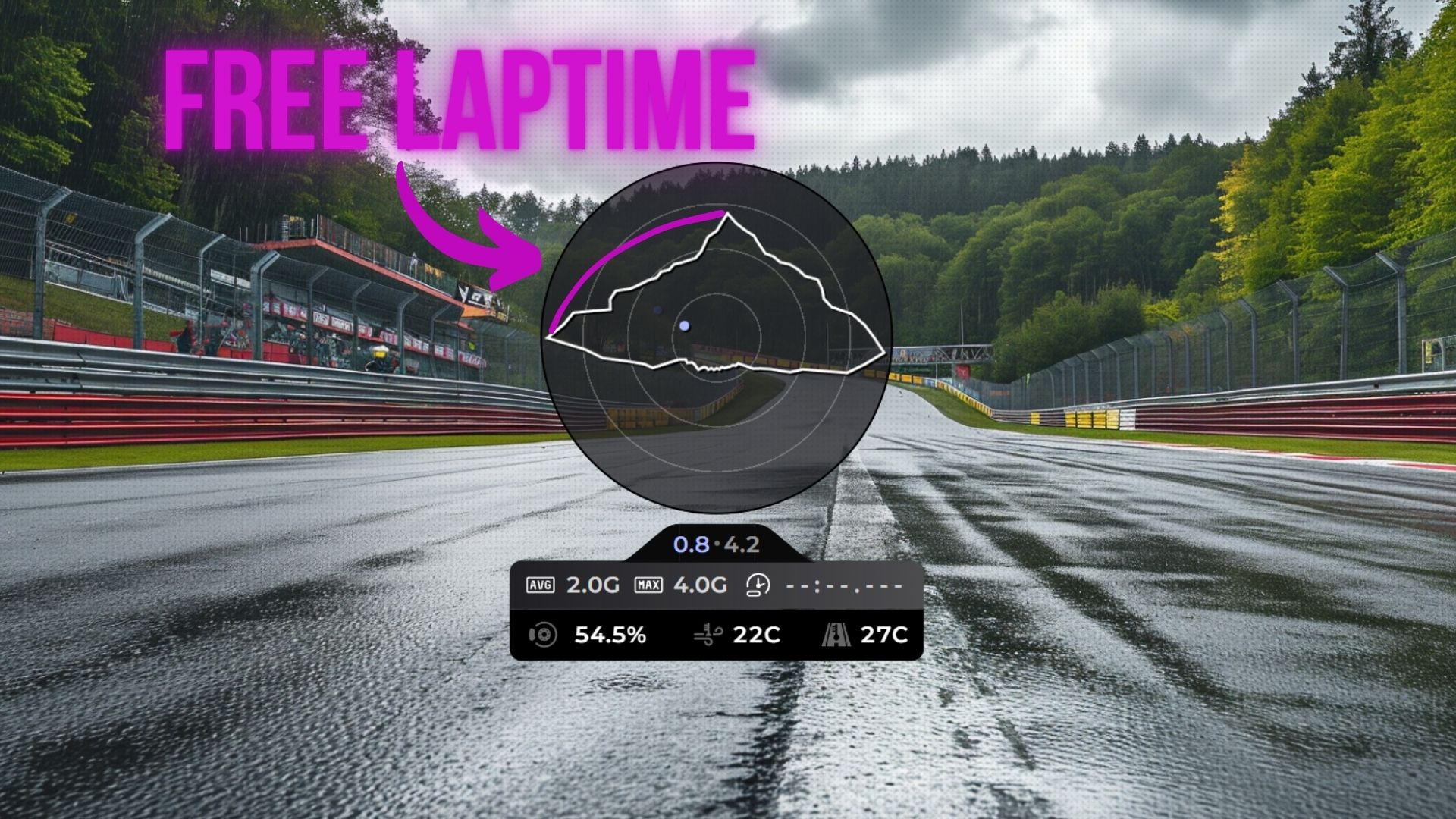
<p>Feel the forces! The brand new <strong>G-Force Meter</strong> overlay is here. 🎯</p>
<h3 class="anchor anchorTargetStickyNavbar__dyZ" id="what-is-a-traction-circle">What is a traction circle?<a href="https://garage.racelab.app/news/2025/09/22/2025/g-force-meter#what-is-a-traction-circle" class="hash-link" aria-label="Direct link to What is a traction circle?" title="Direct link to What is a traction circle?" translate="no">​</a></h3>
<p>The traction circle (also known as a friction circle) is one of the most powerful tools for understanding vehicle dynamics. It visualizes the total grip your tires have available and how you're using it at any given moment.</p>
<p>Your tires can only produce a finite amount of grip. That grip can be used for <strong>braking</strong>, <strong>accelerating</strong>, or <strong>cornering</strong> - but the total is always limited. The traction circle shows this as a circular boundary: the closer the dot is to the edge, the more grip you're using. If the dot stays inside the circle, you have grip to spare. If it hits the edge, you're at the limit.</p>
<h3 class="anchor anchorTargetStickyNavbar__dyZ" id="what-does-this-tell-you-as-a-driver">What does this tell you as a driver?<a href="https://garage.racelab.app/news/2025/09/22/2025/g-force-meter#what-does-this-tell-you-as-a-driver" class="hash-link" aria-label="Direct link to What does this tell you as a driver?" title="Direct link to What does this tell you as a driver?" translate="no">​</a></h3>
<ul>
<li class=""><strong>Trail braking</strong> - A smooth arc from the top of the circle (braking) to the side (cornering) means you're trail braking well. A sudden jump means you're releasing the brake too quickly and losing time</li>
<li class=""><strong>Corner exit</strong> - The transition from cornering to acceleration should be a smooth arc along the circle's edge. Jerky movements mean you're not using all available grip</li>
<li class=""><strong>Smoothness</strong> - Erratic dots bouncing around inside the circle indicate rough inputs. The fastest drivers keep the dot tracing the edge of the circle as smoothly as possible</li>
<li class=""><strong>Finding the limit</strong> - If your dot rarely reaches the outer edge, you're leaving grip on the table. If it's constantly spiking past it, you're overdriving</li>
</ul>
<h3 class="anchor anchorTargetStickyNavbar__dyZ" id="what-you-get">What you get<a href="https://garage.racelab.app/news/2025/09/22/2025/g-force-meter#what-you-get" class="hash-link" aria-label="Direct link to What you get" title="Direct link to What you get" translate="no">​</a></h3>
<ul>
<li class=""><strong>Traction circle</strong> - A live visualization of your lateral and longitudinal G-forces as you drive around the track</li>
<li class=""><strong>Current forces</strong> - Real-time G-force numbers showing exactly how much grip you're using</li>
<li class=""><strong>Peak G-force</strong> - Track your maximum forces to understand the limits of your car</li>
</ul>
<p>The G-Force Meter is also available as a <strong>module inside the Input Telemetry overlay</strong>, so you can combine it with your existing pedal and steering inputs for a complete picture of your driving.</p>
<h3 class="anchor anchorTargetStickyNavbar__dyZ" id="how-to-use-it">How to use it<a href="https://garage.racelab.app/news/2025/09/22/2025/g-force-meter#how-to-use-it" class="hash-link" aria-label="Direct link to How to use it" title="Direct link to How to use it" translate="no">​</a></h3>
<ol>
<li class="">Open your <strong>Layout Editor</strong></li>
<li class="">Add the <strong>G-Force Meter</strong> overlay, or enable the G-Force module in your <strong>Input Telemetry</strong> overlay settings</li>
<li class="">Position it to your liking</li>
<li class="">Hit the track and watch the forces come alive</li>
</ol>
<p>Whether you're working on trail braking, chasing smoother inputs, or just want to understand your driving better, this overlay is an invaluable coaching tool. Share your feedback on <a href="https://discord.com/channels/559298378291216384/688792546838970437" target="_blank" rel="noopener noreferrer" class="">Discord</a>!</p>]]></content>
        <author>
            <name>Racelab</name>
            <uri>https://racelab.app</uri>
        </author>
        <category label="Overlay" term="Overlay"/>
        <category label="Feature" term="Feature"/>
    </entry>
    <entry>
        <title type="html"><![CDATA[ABS Indication in Input Telemetry]]></title>
        <id>https://garage.racelab.app/news/2025/08/15/2025/abs-indication</id>
        <link href="https://garage.racelab.app/news/2025/08/15/2025/abs-indication"/>
        <updated>2025-08-15T00:00:00.000Z</updated>
        <summary type="html"><![CDATA[ABS Indication]]></summary>
        <content type="html"><![CDATA[<p><img decoding="async" loading="lazy" alt="ABS Indication" src="https://garage.racelab.app/assets/images/abs-indication-f28316e2369f151967984522747896b9.png" width="1920" height="1080" class="img_eSjB"></p>
<p>Ever wonder if you're triggering ABS under braking? Now you can see it in real time. 👀</p>
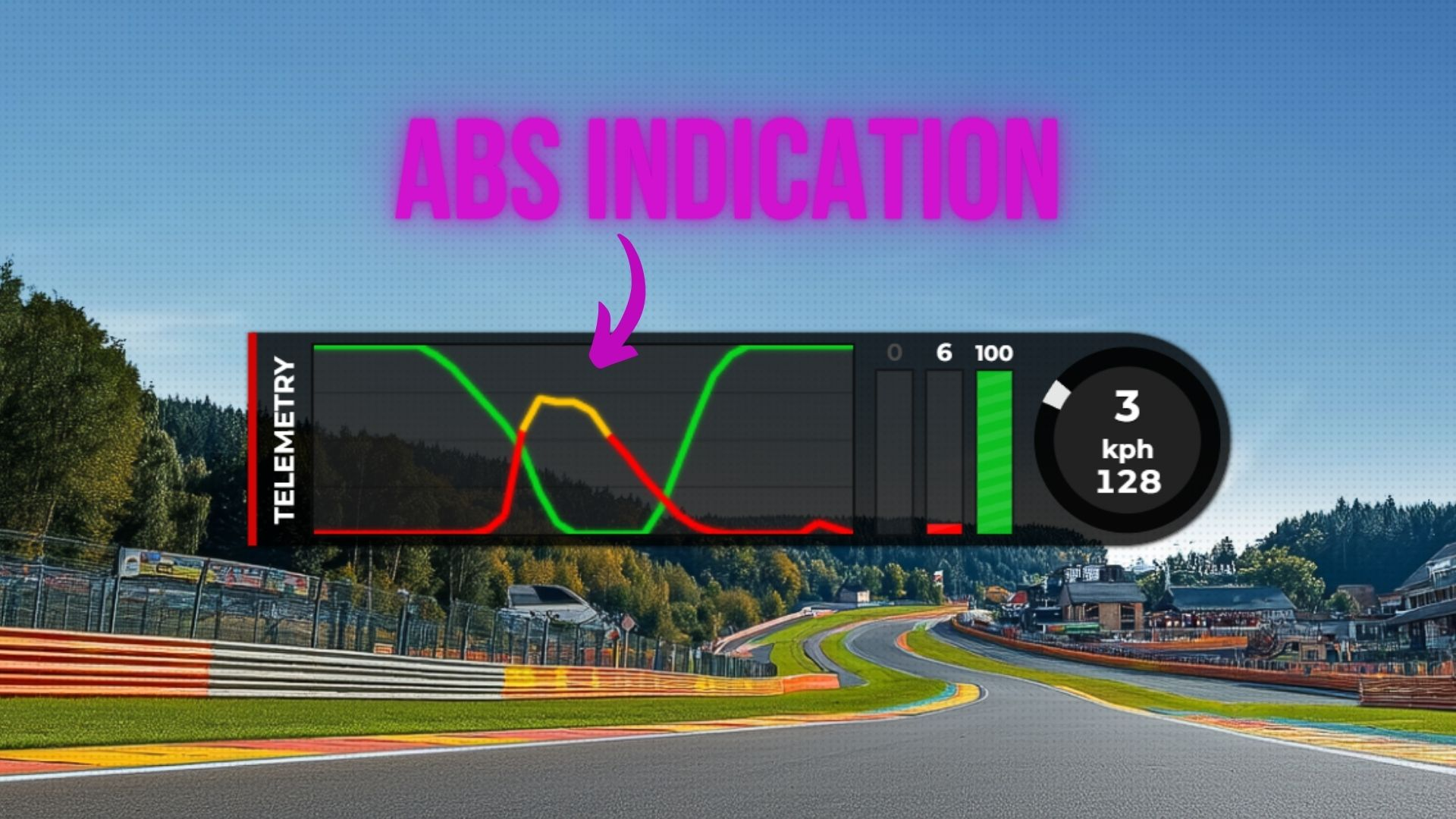
<p>The <strong>Input Telemetry</strong> overlay now includes <strong>ABS indicators</strong> - visible on both the brake telemetry line and the input braking bar.</p>
<h3 class="anchor anchorTargetStickyNavbar__dyZ" id="what-it-shows">What it shows<a href="https://garage.racelab.app/news/2025/08/15/2025/abs-indication#what-it-shows" class="hash-link" aria-label="Direct link to What it shows" title="Direct link to What it shows" translate="no">​</a></h3>
<p>When ABS activates during braking, the overlay will visually indicate it directly on your telemetry:</p>
<ul>
<li class=""><strong>Brake telemetry line</strong> - The ABS activation is highlighted on the brake trace, so you can see exactly when and how often ABS kicks in during your braking zones</li>
<li class=""><strong>Input braking bar</strong> - The brake pressure bar also reflects ABS engagement, giving you an instant visual cue while driving</li>
</ul>
<h3 class="anchor anchorTargetStickyNavbar__dyZ" id="why-this-is-useful">Why this is useful<a href="https://garage.racelab.app/news/2025/08/15/2025/abs-indication#why-this-is-useful" class="hash-link" aria-label="Direct link to Why this is useful" title="Direct link to Why this is useful" translate="no">​</a></h3>
<p>ABS is a safety net - it prevents wheel lockups, but relying on it too heavily means you're not braking optimally. By seeing when ABS activates, you can:</p>
<ul>
<li class=""><strong>Fine-tune brake pressure</strong> - Learn to apply just enough pressure to stay on the edge of locking up without triggering ABS</li>
<li class=""><strong>Improve braking consistency</strong> - Identify which corners you're overbraking and where you could carry more speed</li>
<li class=""><strong>Understand car setup</strong> - See how brake bias and ABS settings affect your braking performance across different corners</li>
</ul>
<h3 class="anchor anchorTargetStickyNavbar__dyZ" id="how-to-use-it">How to use it<a href="https://garage.racelab.app/news/2025/08/15/2025/abs-indication#how-to-use-it" class="hash-link" aria-label="Direct link to How to use it" title="Direct link to How to use it" translate="no">​</a></h3>
<p>The ABS indicators are automatically available in the <strong>Input Telemetry</strong> overlay. Just make sure you have the brake telemetry line or input braking bar enabled in your overlay settings, and the ABS indication will show up whenever ABS engages.</p>
<p>A small addition that can make a big difference in your braking technique. Let us know what you think on <a href="https://discord.com/channels/559298378291216384/688792546838970437" target="_blank" rel="noopener noreferrer" class="">Discord</a>!</p>]]></content>
        <author>
            <name>Racelab</name>
            <uri>https://racelab.app</uri>
        </author>
        <category label="Feature" term="Feature"/>
    </entry>
    <entry>
        <title type="html"><![CDATA[Race Events beta v1]]></title>
        <id>https://garage.racelab.app/news/2025/07/30/2025/race-events-beta-v1</id>
        <link href="https://garage.racelab.app/news/2025/07/30/2025/race-events-beta-v1"/>
        <updated>2025-07-30T00:00:00.000Z</updated>
        <summary type="html"><![CDATA[✨ RaceLab Race Events - Beta Preview]]></summary>
        <content type="html"><![CDATA[<p>✨ <strong>RaceLab Race Events - Beta Preview</strong></p>
<p>Hey Beta Testers!
We’re excited to give you an early look at the <strong>Race Events</strong> feature we’ve been working on. This is a very raw preview, no final design work has been done yet, and there may be bugs or rough edges. Think of it as experimental for now. That said, we believe it has huge potential to level up your sim racing experience, and we’d love your feedback and ideas!</p>
<h3 class="anchor anchorTargetStickyNavbar__dyZ" id="️-how-to-use-it">🛠️ How to use it?<a href="https://garage.racelab.app/news/2025/07/30/2025/race-events-beta-v1#%EF%B8%8F-how-to-use-it" class="hash-link" aria-label="Direct link to 🛠️ How to use it?" title="Direct link to 🛠️ How to use it?" translate="no">​</a></h3>
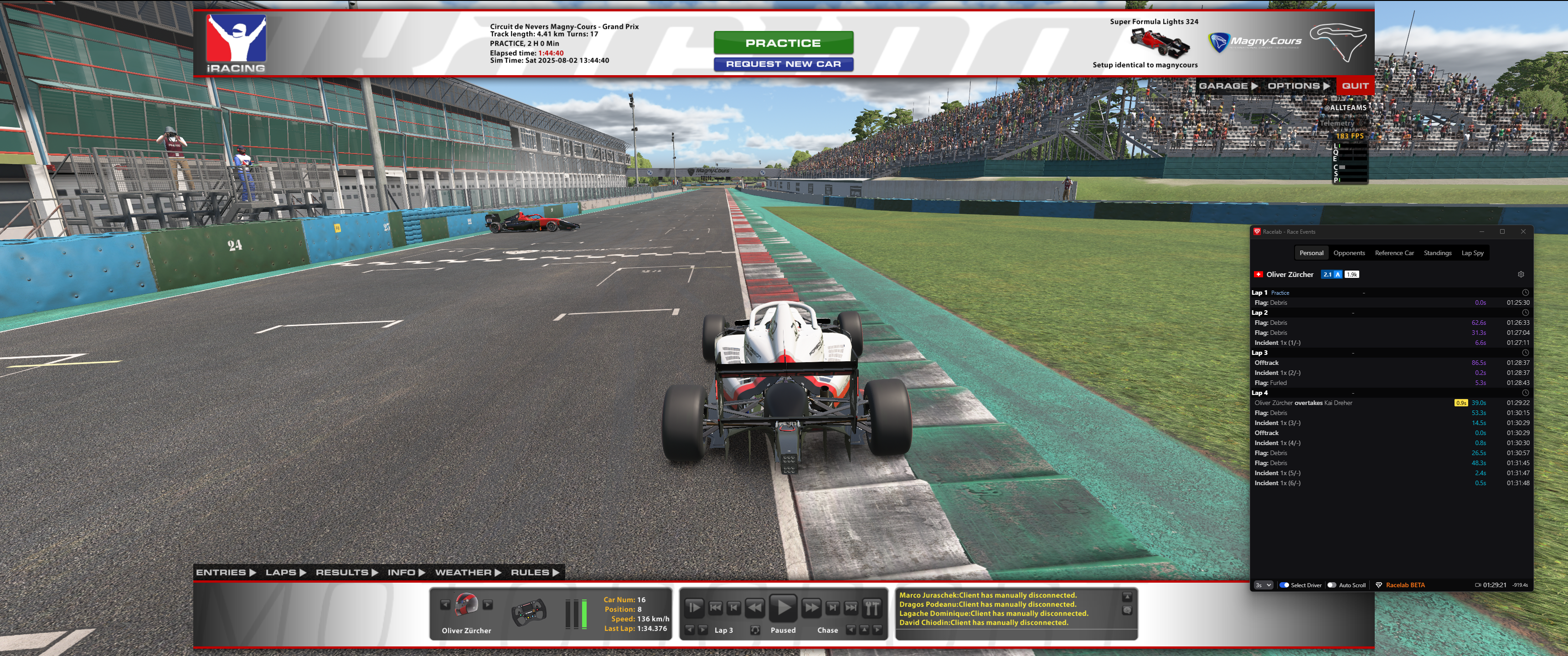
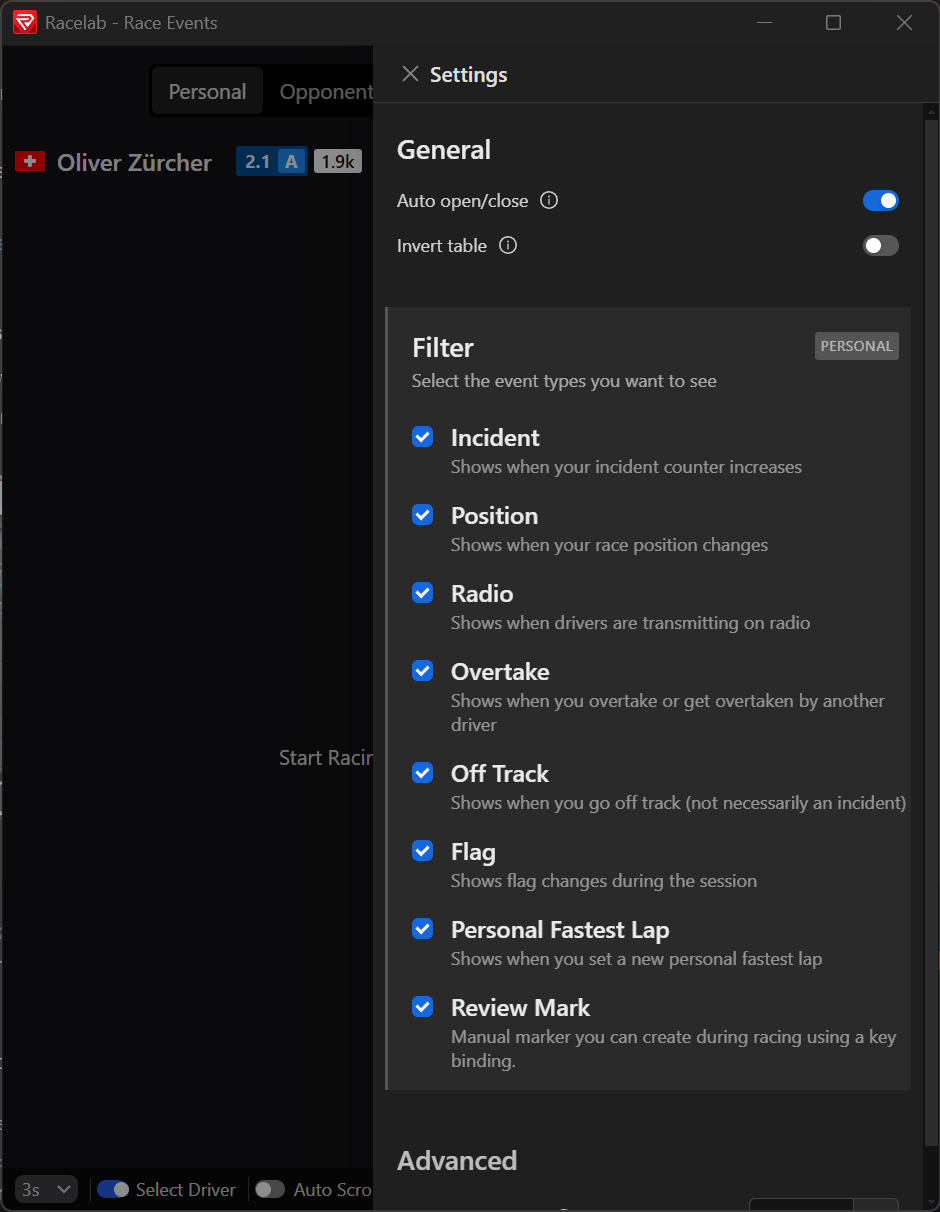
<p>Hop into a session, whenever you leave the cockpit (e.g. switch to Replayer), the Race Events window will automatically pop up and be ready for use.</p>
<h3 class="anchor anchorTargetStickyNavbar__dyZ" id="-key-features">🧩 Key Features<a href="https://garage.racelab.app/news/2025/07/30/2025/race-events-beta-v1#-key-features" class="hash-link" aria-label="Direct link to 🧩 Key Features" title="Direct link to 🧩 Key Features" translate="no">​</a></h3>
<ul>
<li class=""><strong>Personal View</strong>: See your own events from the session, jump to any event in the replay with a click.</li>
<li class=""><strong>Opponents View</strong>: Pick one or more drivers (e.g. your friends) to see their session events.</li>
<li class=""><strong>Reference Car Mode</strong>: Automatically shows events for the car you're currently spectating.</li>
<li class=""><strong>Standings Navigation</strong>: Quickly jump to POVs by driver position.</li>
<li class=""><strong>Lap Spy</strong>: Spot hot laps during the session and replay them easily.</li>
</ul>
<h3 class="anchor anchorTargetStickyNavbar__dyZ" id="️-new-keybindings">⌨️ New Keybindings<a href="https://garage.racelab.app/news/2025/07/30/2025/race-events-beta-v1#%EF%B8%8F-new-keybindings" class="hash-link" aria-label="Direct link to ⌨️ New Keybindings" title="Direct link to ⌨️ New Keybindings" translate="no">​</a></h3>
<ul>
<li class="">Toggle the Race Events window</li>
<li class=""><strong>Review Mark</strong>: Drop a marker during a race to revisit that moment later</li>
<li class="">Cycle through Incidents or Review Marks (Prev / Next)</li>
</ul>
<p>🔗 <a href="https://dl.racelab.app/beta/RacelabApps-6.11.0-raceevents-beta.1.exe" target="_blank" rel="noopener noreferrer" class="">https://dl.racelab.app/beta/RacelabApps-6.11.0-raceevents-beta.1.exe</a></p>
<h3 class="anchor anchorTargetStickyNavbar__dyZ" id="️-installation-notes">⚠️ Installation Notes<a href="https://garage.racelab.app/news/2025/07/30/2025/race-events-beta-v1#%EF%B8%8F-installation-notes" class="hash-link" aria-label="Direct link to ⚠️ Installation Notes" title="Direct link to ⚠️ Installation Notes" translate="no">​</a></h3>
<ul>
<li class="">Install this version <strong>over</strong> your current RaceLab installation</li>
<li class="">You can always revert to the latest stable version via the installer on our website <a href="https://racelab.app/" target="_blank" rel="noopener noreferrer" class="">https://racelab.app</a></li>
</ul>
<h3 class="anchor anchorTargetStickyNavbar__dyZ" id="️-screenshots">🖥️ Screenshots<a href="https://garage.racelab.app/news/2025/07/30/2025/race-events-beta-v1#%EF%B8%8F-screenshots" class="hash-link" aria-label="Direct link to 🖥️ Screenshots" title="Direct link to 🖥️ Screenshots" translate="no">​</a></h3>
<p><img decoding="async" loading="lazy" alt="Race Events" src="https://garage.racelab.app/assets/images/raceevents_screenshot-82264215b9bf80875f9fa525dc65e69a.png" width="3440" height="1440" class="img_eSjB"></p>
<img src="https://garage.racelab.app/assets/images/raceevents_settings-29bee0166a8fd3be62f7e545822354df.png" alt="Race Events Settings" style="width:440px;display:block;margin-top:1rem">]]></content>
        <author>
            <name>Racelab</name>
            <uri>https://racelab.app</uri>
        </author>
        <category label="Beta" term="Beta"/>
    </entry>
    <entry>
        <title type="html"><![CDATA[The New Key Bindings System]]></title>
        <id>https://garage.racelab.app/news/2025/06/03/2025/new-key-bindings</id>
        <link href="https://garage.racelab.app/news/2025/06/03/2025/new-key-bindings"/>
        <updated>2025-06-03T00:00:00.000Z</updated>
        <summary type="html"><![CDATA[{/ Key Bindings /}]]></summary>
        <content type="html"><![CDATA[
<p>We've completely rebuilt the <strong>Key Bindings</strong> system from the ground up! ⌨️</p>
<p>The old key bindings system served us well, but it had limitations - especially when it came to supporting a wide range of input devices. The new system removes those barriers and gives you much more flexibility.</p>
<h3 class="anchor anchorTargetStickyNavbar__dyZ" id="whats-changed">What's changed<a href="https://garage.racelab.app/news/2025/06/03/2025/new-key-bindings#whats-changed" class="hash-link" aria-label="Direct link to What's changed" title="Direct link to What's changed" translate="no">​</a></h3>
<ul>
<li class=""><strong>Unlimited button support</strong> - Bind as many buttons as you need across all your devices. No more running out of slots</li>
<li class=""><strong>Wider device compatibility</strong> - Improved support for a wider range of input devices including button boxes, steering wheel buttons, and USB controllers</li>
<li class=""><strong>Better detection</strong> - More reliable input detection so your bindings work consistently</li>
</ul>
<h3 class="anchor anchorTargetStickyNavbar__dyZ" id="why-we-rebuilt-it">Why we rebuilt it<a href="https://garage.racelab.app/news/2025/06/03/2025/new-key-bindings#why-we-rebuilt-it" class="hash-link" aria-label="Direct link to Why we rebuilt it" title="Direct link to Why we rebuilt it" translate="no">​</a></h3>
<p>As RaceLab has grown to support more overlays, features, and games, the number of actions you can bind has grown too. The old system wasn't built for this scale. The new Key Bindings system is designed to grow with RaceLab and handle whatever input setup you throw at it.</p>
<h3 class="anchor anchorTargetStickyNavbar__dyZ" id="how-to-set-up-your-bindings">How to set up your bindings<a href="https://garage.racelab.app/news/2025/06/03/2025/new-key-bindings#how-to-set-up-your-bindings" class="hash-link" aria-label="Direct link to How to set up your bindings" title="Direct link to How to set up your bindings" translate="no">​</a></h3>
<ol>
<li class="">Open RaceLab and go to <strong>Key Bindings</strong></li>
<li class="">Browse the list of available actions (toggle overlays, open/close windows, etc.)</li>
<li class="">Click on an action and press the button or key you want to assign</li>
<li class="">Done - your binding is active immediately</li>
</ol>
<p>All your existing bindings have been migrated automatically, so you don't need to reconfigure anything.</p>
<p>Got a complex setup with multiple devices? This update was made for you. Let us know how it works on <a href="https://discord.com/channels/559298378291216384/688792546838970437" target="_blank" rel="noopener noreferrer" class="">Discord</a>!</p>]]></content>
        <author>
            <name>Racelab</name>
            <uri>https://racelab.app</uri>
        </author>
        <category label="Feature" term="Feature"/>
    </entry>
    <entry>
        <title type="html"><![CDATA[RacelabVR 3.0 is Here!]]></title>
        <id>https://garage.racelab.app/news/2025/06/03/2025/racelab-vr-3-stable</id>
        <link href="https://garage.racelab.app/news/2025/06/03/2025/racelab-vr-3-stable"/>
        <updated>2025-06-03T00:00:00.000Z</updated>
        <summary type="html"><![CDATA[RacelabVR 3.0]]></summary>
        <content type="html"><![CDATA[<p><img decoding="async" loading="lazy" alt="RacelabVR 3.0" src="https://garage.racelab.app/assets/images/vr-3.0-stable-ed3bfebca32a358df6ba278c1c0de491.png" width="750" height="609" class="img_eSjB"></p>
<p>After months of beta testing and your incredible feedback, <strong>RacelabVR 3.0</strong> is officially stable and available to everyone! 🎉</p>
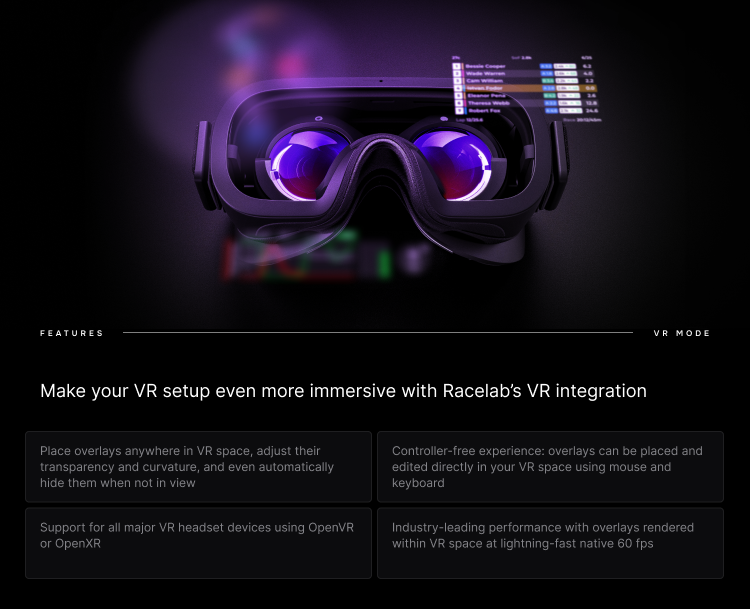
<p>This is a major milestone for RaceLab. VR 3.0 brings native overlay rendering directly into your VR headset, meaning you no longer need to rely on workarounds or third-party tools. Your RaceLab overlays live right there in your virtual cockpit, exactly where you need them.</p>
<h3 class="anchor anchorTargetStickyNavbar__dyZ" id="whats-new-in-vr-30">What's new in VR 3.0<a href="https://garage.racelab.app/news/2025/06/03/2025/racelab-vr-3-stable#whats-new-in-vr-30" class="hash-link" aria-label="Direct link to What's new in VR 3.0" title="Direct link to What's new in VR 3.0" translate="no">​</a></h3>
<ul>
<li class=""><strong>Native VR overlays</strong> - Your overlays render directly in your VR headset with minimal performance impact</li>
<li class=""><strong>Overlay Sets</strong> - Save multiple overlay configurations and switch between them depending on your setup</li>
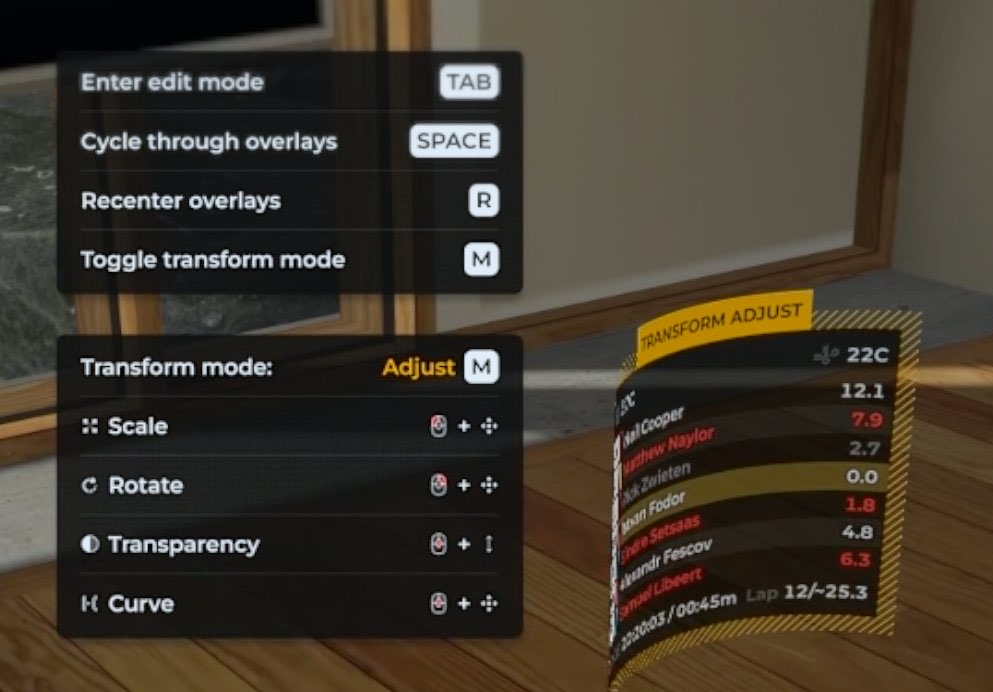
<li class=""><strong>In-headset positioning</strong> - Move and resize overlays while in VR using intuitive controls (Tab, Esc, Space, M keys)</li>
<li class=""><strong>Curvature support</strong> - Bend overlays for a more immersive display (OpenVR)</li>
<li class=""><strong>Gaze-Based Transparency</strong> - Overlays fade based on where you're looking, reducing visual clutter</li>
<li class=""><strong>Resolution scaling</strong> - Fine-tune overlay resolution for the best balance of clarity and performance</li>
</ul>
<h3 class="anchor anchorTargetStickyNavbar__dyZ" id="supported-platforms">Supported platforms<a href="https://garage.racelab.app/news/2025/06/03/2025/racelab-vr-3-stable#supported-platforms" class="hash-link" aria-label="Direct link to Supported platforms" title="Direct link to Supported platforms" translate="no">​</a></h3>
<p>RacelabVR 3.0 works with both <strong>OpenVR</strong> and <strong>OpenXR</strong> runtimes, supporting a wide range of headsets including Valve Index, Meta Quest (via Link/Air Link), HP Reverb, Pimax, Varjo, and more.</p>
<h3 class="anchor anchorTargetStickyNavbar__dyZ" id="getting-started">Getting started<a href="https://garage.racelab.app/news/2025/06/03/2025/racelab-vr-3-stable#getting-started" class="hash-link" aria-label="Direct link to Getting started" title="Direct link to Getting started" translate="no">​</a></h3>
<ol>
<li class="">Make sure you're on the latest version of RaceLab</li>
<li class="">Go to <strong>Settings</strong> and enable <strong>RacelabVR</strong></li>
<li class="">Launch your sim in VR and your overlays will appear in your headset</li>
<li class="">Use the in-headset controls to position them exactly where you want</li>
</ol>
<p>Check our <a class="" href="https://garage.racelab.app/docs/vr/usage">VR documentation</a> for the full setup guide.</p>
<p>A huge thank you to everyone who participated in the beta and helped us shape this release. Your feedback was invaluable! ❤️</p>
<p>Questions or issues? Let us know on <a href="https://discord.com/channels/559298378291216384/688792546838970437" target="_blank" rel="noopener noreferrer" class="">Discord</a>.</p>]]></content>
        <author>
            <name>Racelab</name>
            <uri>https://racelab.app</uri>
        </author>
        <category label="VR" term="VR"/>
        <category label="Feature" term="Feature"/>
    </entry>
    <entry>
        <title type="html"><![CDATA[New Overlay: ERS (Energy Recovery System)]]></title>
        <id>https://garage.racelab.app/news/2025/04/16/2025/ers-overlay</id>
        <link href="https://garage.racelab.app/news/2025/04/16/2025/ers-overlay"/>
        <updated>2025-04-16T00:00:00.000Z</updated>
        <summary type="html"><![CDATA[{/ ERS Overlay /}]]></summary>
        <content type="html"><![CDATA[
<p>Managing your energy just got a whole lot easier! The <strong>ERS overlay</strong> is now available for <strong>LMU</strong> and <strong>rFactor2</strong>. ⚡</p>
<p>Hybrid and electric racing cars rely heavily on energy recovery and deployment. Knowing exactly how much energy you have available - and when to use it - can make the difference between a podium and a DNF. The new ERS overlay and widget give you real-time visibility into your car's energy recovery system.</p>
<h3 class="anchor anchorTargetStickyNavbar__dyZ" id="whats-included">What's included<a href="https://garage.racelab.app/news/2025/04/16/2025/ers-overlay#whats-included" class="hash-link" aria-label="Direct link to What's included" title="Direct link to What's included" translate="no">​</a></h3>
<ul>
<li class=""><strong>ERS Overlay</strong> - A dedicated overlay showing your current energy state</li>
<li class=""><strong>ERS Widget</strong> - A compact datablock you can place anywhere in your layout</li>
</ul>
<h3 class="anchor anchorTargetStickyNavbar__dyZ" id="supported-games">Supported games<a href="https://garage.racelab.app/news/2025/04/16/2025/ers-overlay#supported-games" class="hash-link" aria-label="Direct link to Supported games" title="Direct link to Supported games" translate="no">​</a></h3>
<p>This feature is available for:</p>
<ul>
<li class=""><strong>Le Mans Ultimate (LMU)</strong></li>
<li class=""><strong>rFactor2</strong></li>
</ul>
<h3 class="anchor anchorTargetStickyNavbar__dyZ" id="how-to-add-it">How to add it<a href="https://garage.racelab.app/news/2025/04/16/2025/ers-overlay#how-to-add-it" class="hash-link" aria-label="Direct link to How to add it" title="Direct link to How to add it" translate="no">​</a></h3>
<ol>
<li class="">Open your <strong>Layout Editor</strong></li>
<li class="">Search for <strong>ERS</strong> in the overlay or widget list</li>
<li class="">Add it to your layout and position it to your preference</li>
<li class="">Jump into a session with a hybrid/electric car and watch your energy data come to life</li>
</ol>
<p>Perfect for anyone racing LMH, LMDh, or any hybrid machinery in LMU. Let us know your feedback on <a href="https://discord.com/channels/559298378291216384/688792546838970437" target="_blank" rel="noopener noreferrer" class="">Discord</a>!</p>]]></content>
        <author>
            <name>Racelab</name>
            <uri>https://racelab.app</uri>
        </author>
        <category label="Overlay" term="Overlay"/>
        <category label="Feature" term="Feature"/>
    </entry>
    <entry>
        <title type="html"><![CDATA[RacelabVR v3 Public Beta 5]]></title>
        <id>https://garage.racelab.app/news/2025/04/08/2025/racelab-vr-v3-beta.5</id>
        <link href="https://garage.racelab.app/news/2025/04/08/2025/racelab-vr-v3-beta.5"/>
        <updated>2025-04-08T00:00:00.000Z</updated>
        <summary type="html"><![CDATA[We’ve just released Public Beta 5 of RacelabVR v3! 🎉]]></summary>
        <content type="html"><![CDATA[<p>We’ve just released <strong>Public Beta 5</strong> of <strong>RacelabVR v3</strong>! 🎉</p>
<h3 class="anchor anchorTargetStickyNavbar__dyZ" id="-whats-new">🚀 What’s New<a href="https://garage.racelab.app/news/2025/04/08/2025/racelab-vr-v3-beta.5#-whats-new" class="hash-link" aria-label="Direct link to 🚀 What’s New" title="Direct link to 🚀 What’s New" translate="no">​</a></h3>
<ul>
<li class=""><strong>Fixed</strong> a crash that occurred when entering edit mode due to the welcome overlay.</li>
</ul>
<h3 class="anchor anchorTargetStickyNavbar__dyZ" id="️-important">⚠️ Important<a href="https://garage.racelab.app/news/2025/04/08/2025/racelab-vr-v3-beta.5#%EF%B8%8F-important" class="hash-link" aria-label="Direct link to ⚠️ Important" title="Direct link to ⚠️ Important" translate="no">​</a></h3>
<p>ℹ️ Only <strong>RacelabVR</strong> has been updated in this release.</p>
<p>👉 <a href="https://garage.racelab.app/docs/vr/install" target="_blank" rel="noopener noreferrer" class=""><strong>Download the latest version here</strong></a></p>]]></content>
        <author>
            <name>Racelab</name>
            <uri>https://racelab.app</uri>
        </author>
        <category label="VR" term="VR"/>
        <category label="Beta" term="Beta"/>
    </entry>
    <entry>
        <title type="html"><![CDATA[RacelabVR v3 public beta 4]]></title>
        <id>https://garage.racelab.app/news/2025/04/04/2025/racelab-vr-v3-beta.4</id>
        <link href="https://garage.racelab.app/news/2025/04/04/2025/racelab-vr-v3-beta.4"/>
        <updated>2025-04-04T00:00:00.000Z</updated>
        <summary type="html"><![CDATA[We've just released Public Beta 4 of RacelabVR v3!]]></summary>
        <content type="html"><![CDATA[<p>We've just released <strong>Public Beta 4</strong> of <strong>RacelabVR v3</strong>!</p>
<h3 class="anchor anchorTargetStickyNavbar__dyZ" id="-whats-new">🚀 What’s new?<a href="https://garage.racelab.app/news/2025/04/04/2025/racelab-vr-v3-beta.4#-whats-new" class="hash-link" aria-label="Direct link to 🚀 What’s new?" title="Direct link to 🚀 What’s new?" translate="no">​</a></h3>
<ul>
<li class=""><strong>Fixed</strong> an issue where the Start/Stop VR button could get out of sync.</li>
<li class=""><strong>New:</strong> When starting VR, you'll now see a <strong>Welcome Overlay</strong> that disappears after a few seconds—this helps new users know RacelabVR is working properly.</li>
</ul>
<h3 class="anchor anchorTargetStickyNavbar__dyZ" id="-configjson-changes">🔧 <code>config.json</code> changes<a href="https://garage.racelab.app/news/2025/04/04/2025/racelab-vr-v3-beta.4#-configjson-changes" class="hash-link" aria-label="Direct link to -configjson-changes" title="Direct link to -configjson-changes" translate="no">​</a></h3>
<ul>
<li class="">Added a new top-level property:<!-- -->
<div class="language-json codeBlockContainer_rjL3 theme-code-block" style="--prism-color:#393A34;--prism-background-color:#f6f8fa"><div class="codeBlockContent_Su8o"><pre tabindex="0" class="prism-code language-json codeBlock_tWCI thin-scrollbar" style="color:#393A34;background-color:#f6f8fa"><code class="codeBlockLines_c2Ys"><div class="token-line" style="color:#393A34"><span class="token property" style="color:#36acaa">"showWelcomeOverlay"</span><span class="token operator" style="color:#393A34">:</span><span class="token plain"> </span><span class="token boolean" style="color:#36acaa">true</span><br></div></code></pre></div></div>
<!-- -->You can turn this off if you prefer. Defaults to <code>true</code>.</li>
</ul>
<h3 class="anchor anchorTargetStickyNavbar__dyZ" id="️-important">⚠️ Important<a href="https://garage.racelab.app/news/2025/04/04/2025/racelab-vr-v3-beta.4#%EF%B8%8F-important" class="hash-link" aria-label="Direct link to ⚠️ Important" title="Direct link to ⚠️ Important" translate="no">​</a></h3>
<p>ℹ️ <strong>Make sure to update both Racelab and RacelabVR</strong> to get the latest changes!</p>
<p>👉 <strong><a href="https://garage.racelab.app/docs/vr/install" target="_blank" rel="noopener noreferrer" class="">Download here</a></strong></p>]]></content>
        <author>
            <name>Racelab</name>
            <uri>https://racelab.app</uri>
        </author>
        <category label="VR" term="VR"/>
        <category label="Beta" term="Beta"/>
    </entry>
    <entry>
        <title type="html"><![CDATA[New Overlay: Race Schedule]]></title>
        <id>https://garage.racelab.app/news/2025/03/28/2025/race-schedule-overlay</id>
        <link href="https://garage.racelab.app/news/2025/03/28/2025/race-schedule-overlay"/>
        <updated>2025-03-28T00:00:00.000Z</updated>
        <summary type="html"><![CDATA[Race Schedule Overlay]]></summary>
        <content type="html"><![CDATA[<p><img decoding="async" loading="lazy" alt="Race Schedule Overlay" src="https://garage.racelab.app/assets/images/race-schedule-749d42dba94ee15936ca7a4f0878a952.png" width="1280" height="720" class="img_eSjB"></p>
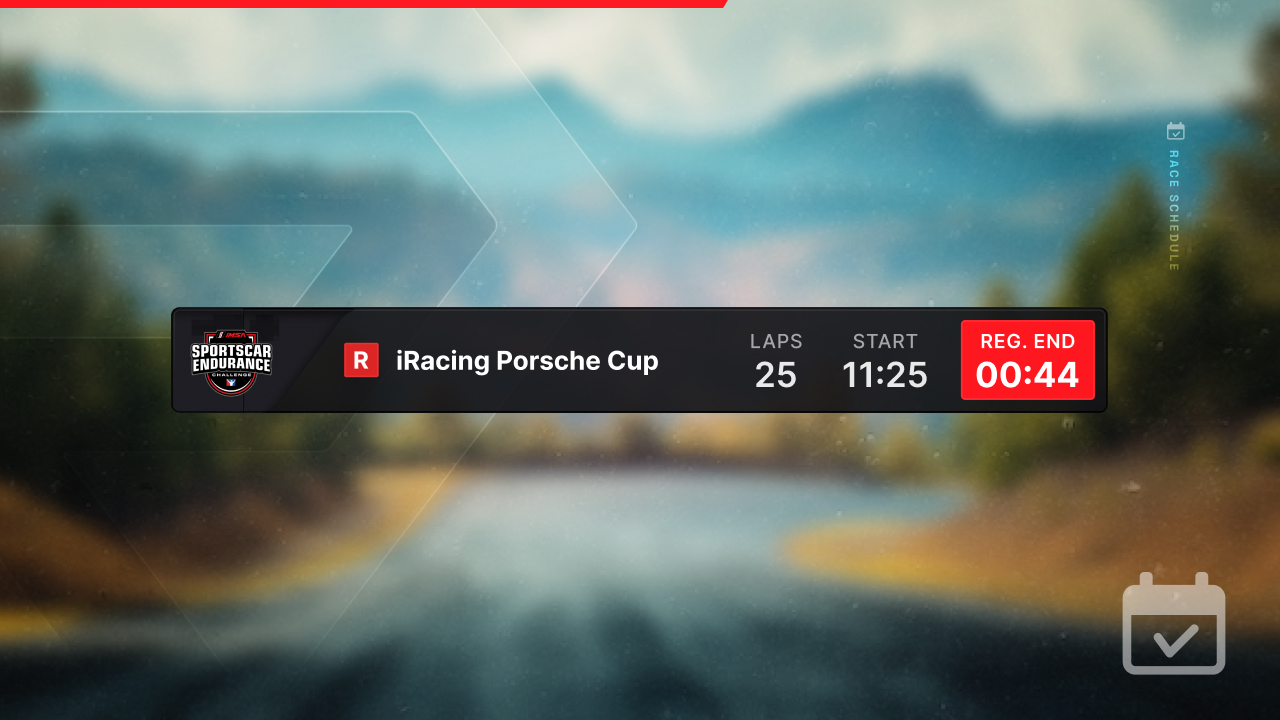
<p>No more alt-tabbing to check when your next race starts! The new <strong>Race Schedule</strong> overlay brings your upcoming sessions right into your layout. 📅</p>
<h3 class="anchor anchorTargetStickyNavbar__dyZ" id="what-it-does">What it does<a href="https://garage.racelab.app/news/2025/03/28/2025/race-schedule-overlay#what-it-does" class="hash-link" aria-label="Direct link to What it does" title="Direct link to What it does" translate="no">​</a></h3>
<p>The Race Schedule overlay shows your upcoming race sessions at a glance. Whether you're waiting for the next official race to go green or planning your evening sessions, this overlay keeps that info right where you need it - on screen, in your layout.</p>
<h3 class="anchor anchorTargetStickyNavbar__dyZ" id="see-it-in-action">See it in action<a href="https://garage.racelab.app/news/2025/03/28/2025/race-schedule-overlay#see-it-in-action" class="hash-link" aria-label="Direct link to See it in action" title="Direct link to See it in action" translate="no">​</a></h3>
<iframe width="100%" height="400" src="https://www.youtube.com/embed/k9VEp8XtiiI" title="Race Schedule Overlay" frameborder="0" allow="accelerometer; autoplay; clipboard-write; encrypted-media; gyroscope; picture-in-picture" allowfullscreen=""></iframe>
<h3 class="anchor anchorTargetStickyNavbar__dyZ" id="how-to-use-it">How to use it<a href="https://garage.racelab.app/news/2025/03/28/2025/race-schedule-overlay#how-to-use-it" class="hash-link" aria-label="Direct link to How to use it" title="Direct link to How to use it" translate="no">​</a></h3>
<ol>
<li class="">Open your <strong>Layout Editor</strong></li>
<li class="">Add the <strong>Race Schedule</strong> overlay from the overlay list</li>
<li class="">Position it wherever works best for you</li>
<li class="">That's it - it will automatically show your upcoming sessions</li>
</ol>
<p>A simple but handy addition to your setup. Let us know what you think on <a href="https://discord.com/channels/559298378291216384/688792546838970437" target="_blank" rel="noopener noreferrer" class="">Discord</a>!</p>]]></content>
        <author>
            <name>Racelab</name>
            <uri>https://racelab.app</uri>
        </author>
        <category label="Overlay" term="Overlay"/>
        <category label="Feature" term="Feature"/>
    </entry>
    <entry>
        <title type="html"><![CDATA[RacelabVR v3 public beta 3]]></title>
        <id>https://garage.racelab.app/news/2025/03/15/2025/racelab-vr-v3-beta.3</id>
        <link href="https://garage.racelab.app/news/2025/03/15/2025/racelab-vr-v3-beta.3"/>
        <updated>2025-03-15T00:00:00.000Z</updated>
        <summary type="html"><![CDATA[We've just released a new version that fixes the jitter issues in OpenXR!]]></summary>
        <content type="html"><![CDATA[<p>We've just released a new version that <strong>fixes the jitter issues</strong> in <strong>OpenXR</strong>!<br>
<em>The default value for <code>useWorldLockedPositions</code> was previously set incorrectly.</em></p>
<h3 class="anchor anchorTargetStickyNavbar__dyZ" id="-important-verify-your-config">🔧 Important: Verify Your Config<a href="https://garage.racelab.app/news/2025/03/15/2025/racelab-vr-v3-beta.3#-important-verify-your-config" class="hash-link" aria-label="Direct link to 🔧 Important: Verify Your Config" title="Direct link to 🔧 Important: Verify Your Config" translate="no">​</a></h3>
<p>Ensure that <code>useWorldLockedPositions</code> in <code>config.json</code> is set to <code>true</code>, or simply remove the entry—it will now default correctly to <code>true</code>.</p>
<p>Alternatively, you can delete the entire config file and let the app generate a fresh one.</p>
<p>The <code>useWorldLockedPositions</code> setting is a workaround for Varjo users. See <a href="https://garage.racelab.app/docs/vr/config#openxruseworldlockedposition-property" target="_blank" rel="noopener noreferrer" class="">here</a></p>
<p>ℹ️ <strong>No need to manually uninstall RacelabVR anymore!</strong></p>
<p>👉 <strong><a href="https://garage.racelab.app/docs/vr/install" target="_blank" rel="noopener noreferrer" class="">Download here</a></strong></p>
<p><img decoding="async" loading="lazy" alt="Curvature Example" src="https://garage.racelab.app/assets/images/curvature-d8e7a5fb75a1da8ed78f0b75cb9a608f.png" width="993" height="692" class="img_eSjB"></p>]]></content>
        <author>
            <name>Racelab</name>
            <uri>https://racelab.app</uri>
        </author>
        <category label="VR" term="VR"/>
        <category label="Beta" term="Beta"/>
    </entry>
    <entry>
        <title type="html"><![CDATA[RacelabVR v3 public beta 2]]></title>
        <id>https://garage.racelab.app/news/2025/03/14/2025/racelab-vr-v3-beta.2</id>
        <link href="https://garage.racelab.app/news/2025/03/14/2025/racelab-vr-v3-beta.2"/>
        <updated>2025-03-14T00:00:00.000Z</updated>
        <summary type="html"><![CDATA[We're excited to release RacelabVR v3 beta.2, bringing new features, enhancements, and bug fixes to improve your VR experience!]]></summary>
        <content type="html"><![CDATA[<p>We're excited to release <strong>RacelabVR v3 beta.2</strong>, bringing new features, enhancements, and bug fixes to improve your VR experience!</p>
<p>⚠️ <strong>Important:</strong> Before installing this update, please <strong>uninstall the previous version of RacelabVR</strong> (the violet one).<br>
<!-- -->🔄 <strong>Racelab will also need to be updated</strong>, but a manual uninstall is <strong>not required</strong> for that one. Just run the setup.</p>
<h3 class="anchor anchorTargetStickyNavbar__dyZ" id="whats-new">What's New<a href="https://garage.racelab.app/news/2025/03/14/2025/racelab-vr-v3-beta.2#whats-new" class="hash-link" aria-label="Direct link to What's New" title="Direct link to What's New" translate="no">​</a></h3>
<ul>
<li class=""><strong>Curvature Support</strong> (OpenVR only) – You can now <strong>bend your overlays</strong> for a more immersive and customizable display.</li>
<li class=""><strong>Resolution Scaling</strong> – Added the <code>resolutionScale</code> property to <code>config.json</code>, allowing for better resolution tuning, particularly for <strong>Varjo headset users</strong>. Learn more <a href="https://garage.racelab.app/docs/vr/config/#resolutionscale-property" target="_blank" rel="noopener noreferrer" class="">here</a>.</li>
<li class=""><strong>Gaze-Based Transparency</strong> – Overlays can now dynamically fade based on where you look. Configure this using the <code>fadeout</code> property in the <a href="https://garage.racelab.app/docs/vr/config/#default-config-file" target="_blank" rel="noopener noreferrer" class="">config.json</a>.</li>
</ul>
<p>Give it a try and let us know your feedback! 🚀</p>
<p>➡️ <a href="https://garage.racelab.app/docs/vr/install/" target="_blank" rel="noopener noreferrer" class="">Download &amp; Install instructions</a></p>]]></content>
        <author>
            <name>Racelab</name>
            <uri>https://racelab.app</uri>
        </author>
        <category label="VR" term="VR"/>
        <category label="Beta" term="Beta"/>
    </entry>
    <entry>
        <title type="html"><![CDATA[RacelabVR v3 public beta]]></title>
        <id>https://garage.racelab.app/news/2025/03/11/2025/racelab-vr-v3-beta</id>
        <link href="https://garage.racelab.app/news/2025/03/11/2025/racelab-vr-v3-beta"/>
        <updated>2025-03-11T00:00:00.000Z</updated>
        <summary type="html"><![CDATA[This has been at the top of our roadmap for over two years — and for good reason. VR integration has been one of the most challenging things we’ve tackled. With so many different hardware setups and environments, finding a solution that truly meets our expectations was anything but easy.]]></summary>
        <content type="html"><![CDATA[<p>This has been at the top of our <a href="https://roadmap.racelab.app/" target="_blank" rel="noopener noreferrer" class="">roadmap</a> for over two years — and for good reason. <strong>VR integration has been one of the most challenging things we’ve tackled.</strong> With so many different hardware setups and environments, finding a solution that truly meets our expectations was anything but easy.</p>
<p>We went through countless iterations, scrapped entire approaches, and started over multiple times. It took much longer than we (or you) would have liked ⏳, but we refused to settle for something that didn’t feel right.</p>
<p>That’s why we’re beyond excited to finally announce the public beta of RacelabVR v3! 🎉</p>
<p>We’d love to hear your feedback — your input will help us fine-tune the experience! 🎯</p>
<p>To ensure the smoothest setup, please carefully follow the <a href="https://garage.racelab.app/docs/vr/install" target="_blank" rel="noopener noreferrer" class="">installation guide</a> 🛠️.</p>
<p>Thank you for your patience and support. We know the wait was long, and we appreciate you sticking with us. Now, let’s make VR racing even better! 🏎️💨</p>
<p>P.S. Don’t just let us know if something is broken — we’d also love to hear what GPU/CPU/VR-Goggles works well for you! Our hardware selection is limited (and we've tested a lot!), so your feedback is invaluable! Post it in our <a href="https://discord.com/channels/559298378291216384/688792546838970437" target="_blank" rel="noopener noreferrer" class="">Discord Channel</a></p>]]></content>
        <author>
            <name>Racelab</name>
            <uri>https://racelab.app</uri>
        </author>
        <category label="VR" term="VR"/>
        <category label="Beta" term="Beta"/>
    </entry>
</feed>